
Specs are compiled from manufacturer listings and verified buyer reviews and can change over time — please confirm the key details on the product page before buying.
Your condenser mic needs power, and a plain XLR-to-USB cable will not supply it. You need a converter box with 48V phantom power (the voltage that powers a condenser mic) built in, like the Shure MVX2U. If you own a dynamic mic and just want the fastest path into a laptop, a braided adapter cable does the job for very little money. That single split — phantom power or no phantom power — decides most of this category for you.
This guide is built by comparing the manufacturers’ published specifications and the patterns across verified customer reviews, so you get each pick’s real strengths and trade-offs instead of marketing spin.
One honest note up front: this list uses flexible, human-like matching, so a few picks are the nearest same-type equivalent rather than the exact model you typed into the search bar. Every one of them still takes a female XLR in and puts USB out. Below you will find the honest trade-offs behind the best XLR to USB adapter options, sorted by what they actually do to your signal.
Top Picks


How To Choose The Best XLR To USB Adapter
The mistake almost every first-time buyer makes is buying the cable first and asking about the microphone later. Flip that order. Look at the microphone body, work out whether it is dynamic or condenser, and only then pick your adapter type. A condenser mic (the kind that needs external electricity to work at all) will sit silent or barely audible on a cable — no adapter cable supplies the 48 volts it needs. A dynamic mic (the rugged kind used on stage) generates its own signal and can run straight down a cable into a USB port.
Phantom power is the first fork in the road
Phantom power — written as 48V — is electricity pushed up the XLR line to feed a condenser microphone. Adapter cables are passive: they convert the signal and nothing more. Converter boxes like the Shure MVX2U and the Pyle PDUSBPP10 build a 48V supply inside the housing, which is why they cost more and take up more desk space. If your mic box says condenser anywhere on it, shop only in the box camp.
Gain in decibels decides how loud your recordings land
Gain is simply the amount the adapter boosts your mic signal, measured in decibels (dB). Quiet dynamic mics — the broadcast-style ones with low output — need a lot of it. The Shure box offers up to 60dB, while one of the cables here adds a fixed 21dB chip. A cable with no gain control and no software means you fix everything after the fact by dragging a digital slider up, which lifts the hiss along with the voice.
Sample rate and bit depth: where these adapters top out
Bit depth and sample rate describe how much detail is captured per second of audio. More is better on paper, but for podcasting and video calls, 16-bit at 44.1 kHz or 48 kHz is entirely normal. Several cables here lock at 16-bit/44.1 kHz or 16-bit/48 kHz, and a couple of buyers noticed a cap that their computer could beat with a different cord. If you edit music rather than speech, that ceiling matters. If you record voice for the internet, it does not.
Connector ends: USB-A, USB-C, and matching your machine
The microphone end is always a female XLR — the three-pin socket your mic cable plugs into. The computer end splits into USB-A (the old rectangular plug) and USB-C (the small oval one). Modern laptops and iPhones lean USB-C; desktops and older laptops still favour USB-A. Buy for the port you actually own, or budget for a small adapter, and remember that a wide chunky USB-A plug can block the port beside it.
Side-by-Side Comparison
| Model | Best For | Phantom Power | Computer End | Sample Rate | Amazon |
|---|---|---|---|---|---|
| Shure MVX2U★ Best Overall | Condenser mics and broadcast dynamics | 48V built in | USB-C | 48 kHz max | Amazon |
| DUKABEL D60NBudget Champion | Cheap dynamic-mic cable | None | USB-A | 48 kHz | Amazon |
| Pyle PDUSBPP10Premium Pick | Desktop box with mix control | +48V | USB-A | — | Amazon |
| CableCreation USB-C | Phone and tablet recording | None | USB-C | 44.1 kHz / 16-bit | Amazon |
| Devinal USB-C | Mobile recording on a budget | None | USB-C | 44.1 kHz / 16-bit | Amazon |
| HUALEU 10Ft | Low-output dynamic mics | None | USB-A | — | Amazon |
| Disino XLR to USB | Zoom calls and casual voice | None | USB-A | 44.1 kHz | Amazon |
| SinLoon 6.5FT | Short braided tangle-free runs | None | USB-A | 16-bit / 48 kHz cap | Amazon |
| Mugteeve 10Ft | Long cable runs with a +10dB boost | None | USB-A | 44.1 or 48 kHz | Amazon |
Detailed Reviews
1. Shure MVX2U XLR-to-USB Audio Interface with Headphone Jack
Our pick — 4.5+★ from 750+ verified ratings; the strongest balance of quality and price.
The little metal slab that turns any XLR mic into a recording rig — condenser or dynamic.
This is the only pick here that removes the guesswork in both directions. It is a full audio interface shrunk to a 100-gram body, with a female XLR on one side and USB-C on the other. Inside sits a preamp with up to 60dB of gain and a 48V phantom supply, which means anything from a low-output broadcast dynamic to the most sensitive condenser will actually register. That is why it holds the top spot — 4.5+ stars across 780+ owners, and the crowd favourite of the group.
The headphone jack is the quiet hero. Zero-latency monitoring over a 3.5mm output means you hear yourself in real time with no echo trailing your voice, which matters the moment you try to perform rather than talk. You can also mount it two ways: plug it straight onto the microphone body or run it inline on an XLR cable. Unlike the passive cables below, this one never asks you to buy anything else to make a condenser work.
The ceiling is where it bites back. It records at 48 kHz maximum (48,000 samples per second), which is plenty for streaming, Zoom and podcasting but will feel cramped if you edit music at higher rates. The companion app is where all the buttons live — limiter, EQ, high-pass filter — so there are no dials on the metal itself. The mobile app has not supported this model, meaning those settings may not follow you onto a phone. Its 1m USB-C cable also rules out older USB-A laptops without an adapter.
What earns it first place
- 48V phantom power plus up to 60dB of gain runs condenser and dynamic mics alike.
- Zero-latency 3.5mm headphone monitoring, so your voice lands in sync with your ears.
- Powered entirely over USB, with 48V pulled up the line from the port.
- Mounts directly on the mic or inline on a cable — your choice of rig.
What to know before you buy
- Tops out at 48 kHz, so music work with higher-rate files is off the table.
- Every control sits in the ShurePlus Desktop app; the hardware itself is button-free.
- One unit in a multi-pack order arrived powered but unrecognised — check yours the day it lands.
Worth it for: anyone running a condenser mic or a low-output broadcast dynamic who wants a one-piece solution with real-time monitoring.
Think twice if: you record music at rates above 48 kHz or need physical knobs under your fingers.
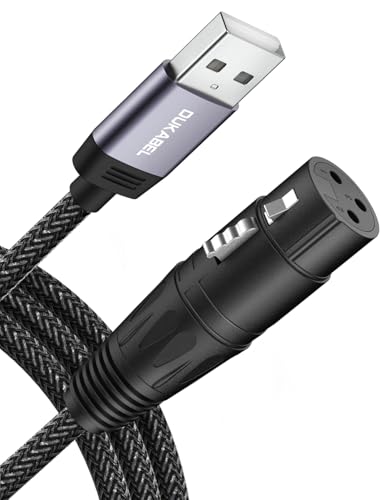
2. DUKABEL USB Microphone Cable XLR to USB-A
A braided no-driver cable that gets a stage dynamic into a laptop port without a single box.
For a dynamic microphone owner who just wants the shortest distance between the mic and the machine, this 8-foot cord is the honest answer. Metal connectors, a reinforced casing and a nylon braided jacket are the whole pitch — and at this price band, they are enough. The built-in converter rides inside the plug housing, so you plug in and record. No driver install, no software to learn.
The line stays genuinely quiet, with shielding that keeps computer interference out of the signal. What wins people over is the build: the braided jacket and metal ends survive regular coiling without fraying, and the USB-A plug goes straight into any port you already own. One clean run from an SM 57 into a laptop port is exactly the scenario this cable was built for — as buyers report, it “amazingly works directly from an SM 57 low impedance mic into a laptop USB port.”
Two things you must plan around. It only flows one way — microphone into computer — so it will not feed audio out to a speaker. And the gain is fixed at the factory, with no software included to change it; on a quiet mic you push the digital slider instead and hope for the best. Buyers pairing it with an SM58 have found that thin arrangement unforgiving. It also lists no smartphone support in any reliable form.
Straight read for dynamic owners: a durable, low-noise passive cable with the converter built in. The built-in converter captures soft, distant sources cleanly for the price, without the audio-level glitch some rival cables report.
The honest catch: with no gain adjustment and no app, you are at the mercy of how hot your mic runs. Low-output dynamics will need heavy digital gain and the hiss that comes with it.
Reach for this if: you own a dynamic mic, a USB-A port and no appetite for software.
Look elsewhere if: your mic is quiet, your mic is a condenser, or you need gain control on the wire.
3. Pyle PDUSBPP10 Microphone XLR-to-USB Signal Adapter
The desktop box that brings phantom power, a headphone dial and a mute button to the table.
The microphones are the same on both ends, but the middle is where this diverges from the Shure above. Pyle houses its converter in a 6.4-ounce machined aluminum body with a +48V phantom supply inside, so condenser mics work without a separate power unit. On top of that you get an adjustable headphone volume dial and a mix control that blends your microphone against the computer playback in your ears. Monitoring through headphones is not an afterthought here — it is the point.
Buyer reviews say it punches above its tier: build quality is what owners dwell on most. Experienced recordists have replaced bulky interfaces with this box and report the same clean signal in their DAW. The aluminum housing is also a genuine desk feature rather than a plain plastic shell.
Treat the gain dial as a teammate, not a hero. Push it hard and the noise floor rises with it; the sweet zone is low-to-mid gain with a confident input, which is exactly why low-output broadcast dynamics benefit from an inline preamp ahead of this box. The blue and green mute LED also splits opinion — red and green would read clearer. It needs a USB-A port, and the box itself is the mic-less part: your own microphone is not included.
Why pros keep one on the desk: a driverless, feature-dense box that talks to Windows, Mac and Linux with a 48V supply and real monitoring controls. Install it once and it stays recognised across reboots, like a permanent fixture on the desk.
Where it asks patience: high-gain hiss and the colour language of the mute light are the two recurring frustrations. Neither kills a recording made at sensible levels.
Your move if: you want phantom power plus headphone monitoring and mix control without paying for a full studio interface.
Step past it if: you refuse to manage gain manually or only ever have USB-C ports free.
4. CableCreation XLR Female to USB-C Recording Cable

A 10-foot braid that lands a dynamic mic directly into a phone, tablet or modern laptop.
If your recording device has a USB-C port rather than a rectangular USB-A slot, most of this list is off the table before you start. This one ends in the small oval plug, so an iPhone 15 series, a Samsung Galaxy S8 or newer, a MacBook, an iPad or a Fire tablet all become recording rigs. The 10-foot length lets you set the mic where it suits the room and leave the device on the desk. That distance is the whole reason this cable exists.
Inside, a 16-bit / 44.1 kHz converter chip captures the ambient sound without obvious loss, and oxygen-free copper shielding keeps the noise floor down. Polypropylene braid on the outside keeps the cable flexible and sturdy over time. Buyers describe the build as the standout, and the 10-foot reach with a two-year warranty attached is a rare thing at this tier. Students using online DAWs have run a clean signal from a dynamic SM58 straight into a Chromebook with nothing else in the chain.
Set your expectations where the spec puts them. This cable carries signal only and supplies no power at all, so a condenser microphone has to be fed by a separate 48V phantom supply. One buyer found it would not pick up a condenser model without additional support, which is the same story this category repeats. It also will not work in reverse, so there is no path for computer audio to feed a microphone.
The case for it
- True USB-C on one end for phones, tablets and modern laptops.
- 10 feet of braided, shielded cable that keeps the converter out of the chain.
- Plug and play across Windows, macOS, iOS, Android and Linux with no driver.
- Two years of warranty coverage on a very budget-tier purchase.
What it will not do
- Supplies no phantom power, so condensers need a separate 48V supply.
- One-way only — no audio flows out of the USB-C end.
- Caps around 16-bit / 44.1 kHz, which is fine for speech but not for hi-res music files.
Pick this one when: your port is USB-C and your mic is a dynamic.
Keep shopping if: you need to power a condenser or work in higher sample rates.
5. Devinal XLR Female to USB-C Recording Cable, 3M

The cable that lets you skip the interface — as long as your mic brings the output.
This 3-meter USB-C XLR cable is aimed at the person who bought a Rode PodMic or an SM57 and does not want a mixer on the desk. Buyers with that exact setup report it works without an interface, which is the whole appeal of this category. The build is the thing that keeps coming up: nylon braid, a spring strain relief at the input plug, oxygen-free copper conductors and a 1.6 PVC insulation layer around a dense stranded copper shield. Heavy metal housing on the XLR end finishes a sturdy-feeling unit.
Inside is a 16-bit / 44.1 kHz converter chip. The silicone-coated cable connects to a Mac, PC, iPad, iPhone or Android device and appears as an input, and the shorter run keeps your rig tidy. Someone with a 25-year-old Sennheiser found the cable brought the microphone back into service with nothing else in line — that is the joy case for this cable.
The catch is the one this cable cannot solve: it cannot supply 48V, so low-output broadcast mics stay barely audible. A Shure SM7B sits on the wrong side of that line without a preamp — the gain dials on the wire simply are not there, and an inline preamp cannot be powered by this cable either. A separate self-powered preamp is the fix, and once you add one you are paying close to interface money, which is why the manufacturer labels this best for dynamic mics with output to spare.
What lands well: a tough braided body that survives daily use, genuine USB-C placement, and a converter that keeps high-output dynamics clean.
What it asks of you: your microphone’s own output has to carry the load. Low-sensitivity dynamics will not make it through without help, and the cable cannot supply the phantom power that a condenser would demand.
For the podcaster: a dynamic mic with real output and a USB-C port is the exact combination this cable rewards.
Not for the condenser owner: no 48V, no monitoring and no gain controls live here.
6. HUALEU XLR Female to USB Mic Link Converter Cable, 10 Feet

The one passive cable with a gain chip — +21dB of lift for a stubborn dynamic mic.
This is the cable to look at if you tried a bare adapter and found your voice sitting too low. A digital chip inside adds +21dB of gain to lift input sensitivity on low-output dynamic microphones, which is the difference between a hiss-heavy recording and a usable one. The build backs it up: a zinc alloy shell, gold-plated copper connectors for corrosion resistance, and a 24AWG double-shielded cable to cut interference. It even runs off 2.7V to 5V from the USB port itself, no external power needed for a dynamic mic.
Compatibility is broad here. It works with Windows 7 through 11, Mac OS, Linux and Chrome OS, and at 10 feet it gives you room to move the mic without stretching. Quality is what buyers notice most, and the practical reviews back it — a clean, near-silent run that reinstates a Zoom recorder mid-project is the sort of save this cable earns.
The limits follow the same rule as every other cable here. Passive means no phantom power, so a capacitive microphone needs its own external 48V supply. Casual recording is the honest ceiling — one buyer found the sound slightly noisier than a proper interface would give, which is expected when every bit of gain comes from a chip rather than a preamp. For school work, voiceovers and voice chat it is more than enough.
Where it earns its place: +21dB of on-board gain is rare in a passive cable, and the gold-plated connectors and double shielding match it.
What to expect: the gain boost helps, but it cannot match a real preamp. Push a very quiet mic to the max and you will hear the cost.
Choose it if: you want a little signal lift without buying a box, and your mic is dynamic.
Pass on it if: you run a condenser or need to edit high-fidelity music.
7. Disino XLR Female to USB Mic Link Converter Cable, 6 Feet

Six feet of shielded cable that turns a dynamic mic into a recognisable input on almost any PC.
This is the most-commented-on cable in the group, and it earns that noise through sheer simplicity. There is no software to install: plug the USB-A end into the computer and it appears as an audio input, ready for Zoom or Teams within the minute. Gold-plated connectors, 22AWG 4N oxygen-free copper and a combination of foil and metal braid shielding handle the noise rejection. The 6.0mm jacket keeps it flexible and the cotton yarn wrap inside cuts handling noise.
What people talk about most is the ease of the thing — plug it in and it just works, which is exactly the promise of this product type. One housebound laptop owner tried three other cables before this one finally got Windows to see the mic at all, and it has done the daily video-call shift ever since. The converter is embedded, so nothing else is needed for a dynamic mic.
Then the same wall this category always hits: the cable supplies no 48V phantom power, so condensers are out. Some users report the mic coming through noticeably quiet, and the USB connector is a broad one that can block an adjacent port. It can also hijack playback on some machines, so check your audio settings after plugging in. Keep a separate TRRS port free if you plan to plug headphones in, since this cable has no headphone pass-through of its own.
What keeps it on the shortlist
- Appears as an input device with zero setup, which suits non-techies perfectly.
- Foil and braid shielding plus gold-plated ends keep interference out.
- Reliable with dynamic mics across common Windows and Mac systems.
- 6 feet of sturdy braided cable without clutter.
What you should know
- No 48V, so condenser microphones need separate phantom power.
- The wide USB plug can block a neighbouring port.
- Some users find the mic quiet, and Windows may switch its playback device on connection.
Built for: the dynamic mic that lives on a desk and needs to work in a call in ten seconds.
Skip past it if: you need phantom power or a thin plug for a tight port cluster.
8. SinLoon XLR to USB Microphone Cable, 2m/6.5FT Braided

The short red-and-black braid for tidy desktops and short runs between mic and PC.
At 2 metres, this is the tidy-desk choice. The braided exterior is abrasion-resistant and tangle-resistant, which matters when the run is short and lives in a fixed spot. Inside, an oxygen-free copper conductor carries the signal with minimal resistive loss, and a copper braiding layer plus spiral aluminium foil wrap form a two-layer shield against interference. Metal connectors resist corrosion, and the manufacturer puts the plug through a 10,000 plug-unplug test cycle. No driver is needed; Windows and macOS just pick it up as an input.
Most of what goes wrong with this cable is a mismatch between promise and practice. The converter caps the signal at 16-bit / 48 kHz, and a PC that can manage higher rates will not get them through this cable. That said, the cable itself shows up as a microphone in Windows, and some users with good setups report clean audio. The short 2-metre run keeps things simple for a desk-bound streaming setup.
At least a couple of frustrated owners hit a wall: the device appears in Windows but produces only a low buzzy signal from a Shure SM58, or limits real podcast work at 16-bit / 48 kHz. Some of that may be down to the computer’s USB port and configuration, and some is the cable’s own ceiling. If you plan serious broadcast-grade recording, an adapter cable of any kind is the wrong tool; for a desk run into the same machine every day, it is a reasonable short-length buy.
A fair verdict: a well-made, short, tangle-free cable with proper double-layer shielding and durable connectors — a sensible tidy-desk option.
Be realistic: it caps at 16-bit / 48 kHz and is one-way, with no gain controls. Low-sensitivity dynamics may not produce the level you need.
Good match for: a tidy desktop streaming setup with a short run to the PC.
Not the one for: serious podcast editing that needs 24-bit headroom, or condensers needing phantom power.
9. Mugteeve XLR Female to Computer USB Cable, 10 Feet

Three metres of braid with a +10dB boost for desks that sit far from the microphone stand.
The length is the headline here: 10 feet (3 metres), which is more reach than most cables in this category offer at the budget end. The mic end is a metal female XLR, the computer end a USB-A, and the wire is nylon braided for durability. The converter supports both 16-bit and 32-bit at 44.1 kHz and 48 kHz, with a signal-to-noise ratio of 78dB, input impedance of 8.2K Ohm and a +10dB gain boost baked in. In plain terms: respectable headroom for voice, with a small lift for quieter mics.
Setup is genuinely driver-free — USB in, computer recognises it, done. Radio-station users have run field recordings through this converter and reported clean results, and on a MacBook Air it has worked straight into Garage Band. That driver-free reliability at a fraction of studio-interface money is the real bargain here.
Where it falls short is sensitivity. The +10dB boost is modest, and an SM58 running through it can still need heavy digital gain, which brings noise with it. A condenser microphone will need external 48V phantom power, since the cable cannot supply it, and buyers who tried to get a condenser mic to work ended up reaching for a proper interface. Treat it as an easy streaming-and-casual-recording cable and it will treat you well.
Why it works for casual recording: a long, well-made cable with a modest +10dB lift and driver-free setup, at a budget-tier price that leaves room for a proper preamp later.
Where it stumbles: the gain is not enough for very quiet dynamic mics, and there is no phantom power for condensers. For higher-fidelity expectations, a box is the right answer.
It suits: anyone whose microphone stand is across the room and whose needs are voice, streaming or casual recording.
It does not suit: condenser owners or anyone chasing a broadcast-grade noise floor.
Know the Specs
Phantom Power (48V)
Phantom power is voltage sent up the XLR cable to run a condenser microphone. Only a converter box with a built-in supply can provide it — the Shure MVX2U and the Pyle PDUSBPP10 both include 48V, while every cable here requires a separate power box for condensers. If your mic box says condenser, this is the first box on your checklist to tick.
Gain In Decibels (dB)
Gain is how much the adapter muscles your signal up before conversion. The Shure offers up to 60dB, the HUALEU has a +21dB chip, the Mugteeve adds +10dB, and the rest are passive with no adjustment. Quiet dynamic mics want higher gain; most condensers do not need much. Buying more gain than your mic produces leads to noise; buying too little leads to quiet, hissy recordings.
Sample Rate And Bit Depth
Sample rate is how many snapshots per second the converter takes; bit depth is how much detail per snapshot. Common values here are 16-bit at 44.1 kHz or 48 kHz, with the Mugteeve listing 32-bit support. For podcasting, streaming and calling, 16-bit / 44.1-48 kHz is normal. Above that ceiling, look at a proper interface.
Connector Ends (XLR And USB-A vs USB-C)
Every device here accepts female XLR, which is the three-pin socket your mic cable plugs into. The other end is either USB-A (the rectangle) or USB-C (the oval). Modern laptops, iPads and iPhones favour USB-C; desktops and older laptops use USB-A. Mismatches are trivially fixable with a tiny adapter, but they are extra things to remember, so buy for the port you actually own.
Common Questions
Will an XLR-to-USB cable work with my condenser microphone?
Can I plug an XLR-to-USB adapter into my phone instead of a computer?
Why is my microphone so quiet through an XLR-to-USB cable?
Do I need to install drivers for an XLR-to-USB adapter?
What is the difference between a passive cable and a converter box?
Can I use an XLR-to-USB cable for gaming consoles?
Will a 10-foot cable sound worse than a 6-foot cable?
Does an XLR-to-USB cable work in both directions?
Which connector type should I pick, USB-A or USB-C?
Is an audio interface better than an XLR-to-USB cable?
The Bottom Line
For most buyers, the best XLR to USB adapter is the Shure MVX2U, because the 48V phantom supply and 60dB of gain make it work with any microphone on your shelf, not just the easy dynamic ones. If you are running a condenser or a broadcast dynamic and want everything on the desk — 48V, monitoring, mix control — the Pyle PDUSBPP10 is the one to reach for. And if you only need a dynamic mic into a laptop with no fuss, the DUKABEL cable gets you there for very little, and the CableCreation USB-C cable does the same for phones, tablets and modern laptops.
One last nudge: the Shure is the pick most buyers settle on, and its 4.5+ star score is the highest of the group, making it the safest single choice if you cannot decide. Buy it for the phantom power, not the app — the app is where every control lives, and the mic only needs it once.
How we choose
We do not accept paid placement. Every pick is matched to a real buyer and a real use-case; we do not hands-on test units.
Sources
Specifications: manufacturer listings and product documentation. Review insights: verified customer reviews, as of October 2026. Pricing: not shown on this page (it changes often); check the current price via the retailer link.
As an Amazon Associate, Home Digitized earns from qualifying purchases. This does not affect which products we feature.