
Specs are compiled from manufacturer listings and verified buyer reviews and can change over time — please confirm the key details on the product page before buying.
Buying a Zigbee vibration sensor is mostly a question of what you want it to do at 2 a.m. — chirp when a windowpane flexes, ping your phone when the dryer finishes, or quietly log that someone opened the jewelry drawer. The Aqara Vibration Sensor is the one worth starting with for most homes, because it detects tilt and drop movement alongside vibration and runs up to 2 years on its included battery. The catch you need to know before you check out: every sensor here needs a Zigbee hub you likely already own — or will have to buy — and none of them work on Wi-Fi alone.
This guide is built by comparing the manufacturers’ published specifications and the patterns across verified customer reviews, so you get each pick’s real strengths and trade-offs instead of marketing spin.
Two of the three sensors here speak Zigbee through an Aqara hub, while one pairs straight into an Echo or SmartThings setup. That hub question decides more than any spec sheet does, and this guide walks you through picking the right zigbee vibration sensor for the hub you already own.
Top Picks

How To Choose The Best Zigbee Vibration Sensor
Before you shop for a sensor, check that you already own a hub. A Zigbee vibration sensor is a small battery puck that reports movement to a hub over Zigbee — a low-power wireless language that hubs like an Aqara M2, an Echo with a built-in Zigbee radio, or a Home Assistant dongle speak. Without that hub, the sensor has no Zigbee radio to report movement to.
Check your hub before you check the specs
An Aqara sensor wants an Aqara hub for full features, and the Aqara M2 or M1S can each connect up to 64 devices. A ThirdReality sensor pairs directly into Echo (4th Gen), Echo Plus, Echo Show 10, Eero 6, SmartThings, Hubitat, or Home Assistant through ZHA and Z2M. Buy the sensor that matches your existing hub — Aqara, Echo, or SmartThings — and you skip a second purchase entirely.
Sensitivity settings decide your false-alarm rate
A sensor that fires every time a truck rolls past is worse than no sensor at all. Look for adjustable sensitivity: the ThirdReality model gives you four levels through two physical switches, Aqara’s P100 offers 10 levels with custom reporting intervals, and the older Aqara sensor adjusts through its API. Mount high-sensitivity sensors on things that genuinely move — a dryer, a sump pump pipe, a jewelry drawer — not a door that slams.
Vibration, tilt, and open/close are three different jobs
True vibration sensing catches a jarring impact, like glass breaking or a box being lifted. Tilt and orientation sensing catches a drawer sliding open or a safe being tipped. Open/close sensing catches a hinged door. Decide if you need impact, tilt, or open/close alerts, because a sensor tuned for one may sleep through another.
Side-by-Side Comparison
| Model | Best For | Protocol | Battery | Weight | Amazon |
|---|---|---|---|---|---|
| Aqara Zigbee Vibration Sensor★ Best Overall | Everyday vibration, tilt, and drop alerts | Zigbee (Aqara Hub required) | Up to 2 years, 1 Lithium Metal (included) | 0.48 ounces | Amazon |
| THIRDREALITY Smart Vibration Sensor | Loud local siren plus app alerts | Zigbee 3.0 (Echo, SmartThings, Home Assistant) | 1 year, 2 AAA (included) | 2.11 ounces | Amazon |
| Aqara Multi-State Sensor P100 | Door/window plus object monitoring in one body | Zigbee and Thread, Matter compatible | Lithium Metal | 20 g | Amazon |
Detailed Reviews
1. Aqara Zigbee Vibration Sensor
The sensor that catches a tilted drawer and a jarred window with one tiny puck.
The Aqara Vibration Sensor is the smallest, lightest pick here at 0.48 ounces — a fraction of the ThirdReality model’s 2.11 ounces — so you can stick it inside a jewelry drawer or on the back of a picture frame without the mount ever announcing itself. It senses three things: vibration, tilt, and drop. That means a windowpane flexing, a safe being tipped, or a delivery box being lifted all trigger an alert to your phone or the local alarm on an Aqara Hub.
What wins people over is the size, and the user base reflects it: this is a 3.5+ star product across 1,900+ ratings, so there’s a spread of experience here rather than unanimous cheer. The reliable pattern is automation — owners park it on a pill bottle lid and fire an Alexa routine when the cap moves, or velcro it to a dog’s potty button and get a phone ping the moment the pup taps it. It also works as a trigger, so a washing machine finishing its cycle can kick off a notification or another Aqara device.
The honest catch is what “vibration” really means here. The sensor fires on a jarring impact, not a faint hum, so hooking it to an espresso machine or a running truck engine usually disappoints. You can adjust sensitivity through an API in 21 steps, but that takes effort, and the hub you pair it with matters. Aqara’s own M2 or M1S hub open up the full feature set, and you want the sensor within 393 inches (10 meters) of it for a stable link. Third-party dongles like Zigbee2MQTT are not officially supported, so partial functionality is the trade-off there.
Where it earns its place
- Weighs just 0.48 ounces — disappears on a window or inside a drawer
- Handles vibration, tilt, and drop, not vibration alone
- Up to 2 years of battery life from the included Lithium Metal cell
- Doubles as an automation trigger for other Aqara devices
What to weigh first
- Needs an Aqara Hub (sold separately) for its full feature set
- Triggers on firm impacts, so faint motor hum may not register
- Tuning the 21-step sensitivity takes an API detour
The short version: This is the one to start with if you want a nearly weightless sensor on a window, safe, or drawer and you already run (or plan to buy) an Aqara hub.
Hold off when: your Zigbee network runs on a third-party dongle and you need guaranteed full function, or you’re chasing a faint continuous vibration rather than a jarring knock.
2. THIRDREALITY Smart Vibration Sensor

A sensor that doesn’t just text you — it sounds a 110dB siren on the spot.
If you want the alert heard across the house, this is the pick. The ThirdReality sensor packs a 110dB siren — roughly as loud as a smoke alarm — that fires locally, plus a physical mute switch when you’d rather keep it to phone notifications. Sensitivity is adjustable through two physical switches with four levels, so you can dial down a windy window and crank up a jewelry drawer. It pairs straight into the hubs many homes already have: Echo (4th Gen), Echo Plus, Echo Show 10, Eero 6, SmartThings, Hubitat, and Home Assistant through ZHA or Z2M.
Where it shines brightest is the laundry room. Tape it to a washer or dryer at high sensitivity and it announces cycle-finish as an Alexa routine — the review pages describe exactly that, with the sensor declaring the load done across the house. Mount it to a sump pump’s outlet pipe and a Home Assistant automation pings you if the pump hasn’t run in six hours. Multiple buyers report running it for months on the original batteries with the link holding steady, which matches the rated 1-year life from its two AAA cells.
The sizes tell you who this suits: at 2.11 ounces it is noticeably heavier than the 0.48-ounce Aqara, so it’s happier taped to a machine or a box than slipped inside a thin drawer. There’s no built-in suppression period, so a door opening can trigger a second alert about two minutes later, and the very top sensitivity level triggers on wind or loud noise. It’s an indoor sensor — rain is out — and the top mount cover can be stiff to remove on a first pairing. Occasional units have arrived used, but Aqara-style follow-through applies here too: the maker replaced a defective unit next-day for one buyer, who then ran it cleanly in Home Assistant.
The siren sells it: A 110dB alarm with a physical mute switch is the standout feature — you get a real local deterrent alongside app alerts, something the Aqara picks don’t build in.
Screen it for the room: With no alert suppression gap, this fits a utility room, garage door, or safe far better than a front door you pass through constantly.
Reach for this if: you want your sensor to make noise, not just send a push, and your hub is an Echo, SmartThings, Hubitat, or Home Assistant setup.
Look elsewhere if: you’re pairing only into an Aqara hub or you want a featherweight sensor for a paper-thin drawer.
3. Aqara Multi-State Sensor P100
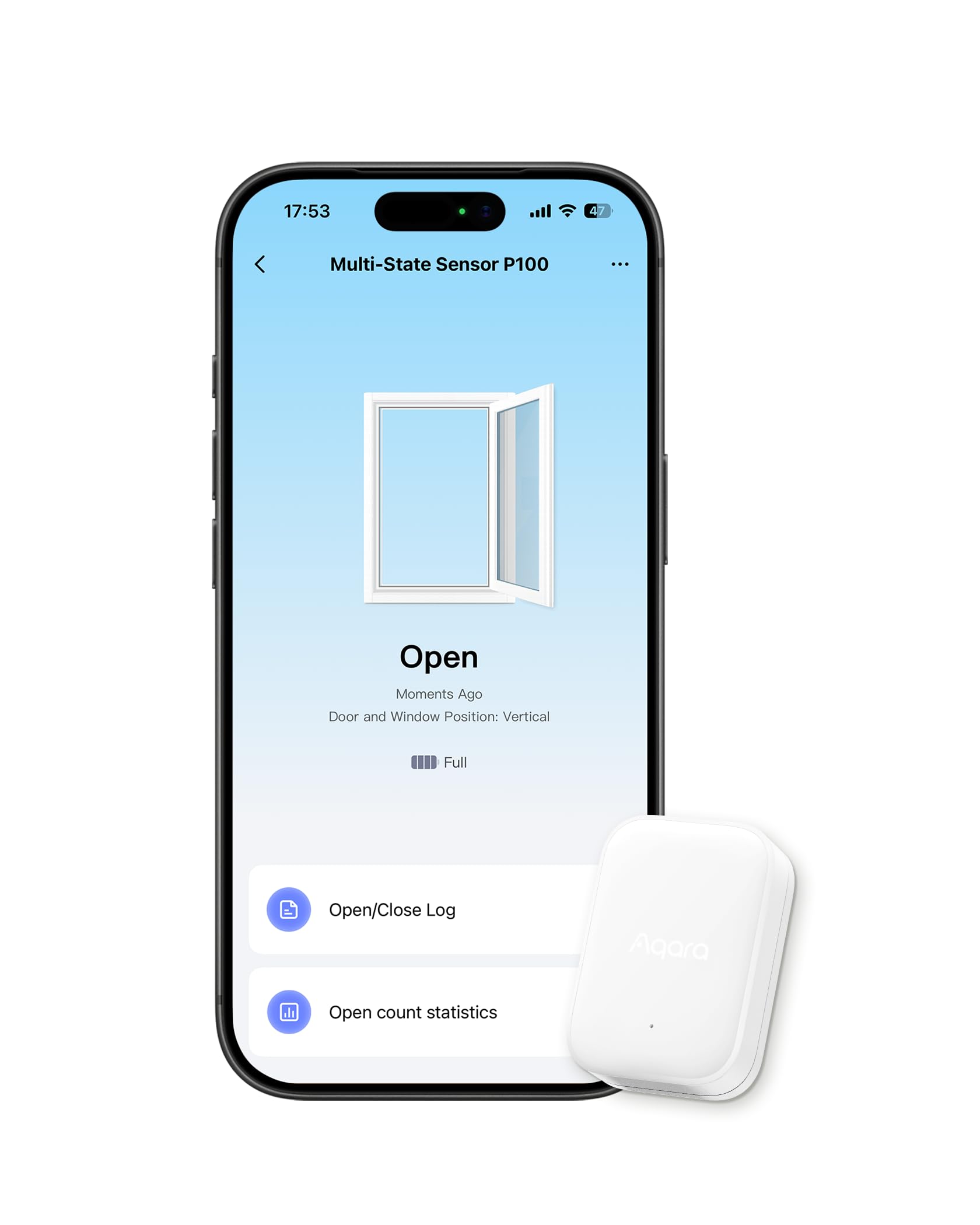
One body that watches a door’s swing and a safe’s tilt, in either Zigbee or Thread.
The P100 is the only sensor here that speaks two languages: Zigbee and Thread, both under the Matter standard, so it can join Apple Home, Google Home, Alexa, SmartThings, Home Assistant, and Homey. That single-body design replaces the classic two-piece magnetic door sensor — no aligning a magnet that drifts once a door sags. In Open/Close mode it tracks hinged doors, casement windows, refrigerators, and safes. Switch it to Object Monitoring in Zigbee mode (an Aqara hub is required for that) and you add orientation, movement, fall, vibration, and triple-tap detection. Ten sensitivity levels and reporting intervals from 5 seconds to 5 minutes let you shape the alerts.
Setup is where it makes friends — that’s the aspect buyers praise most, with a clean install a recurring theme. Owners stick it on a pantry door to flip a light on and off, or run it through Apple Home as a quiet safety alert. Where it asks for patience is reliability: it carries a 3.0+ star score, and the honest read is that it’s a fit-sensitive sensor. The one-piece body needs a quick three-press calibration on its top button to behave, especially for outboard uses like a mailbox, and mounting it on the wrong surface is the fastest route to a stream of false alarms. Give it a stable mount and it settles down.
Know the two-mode rule before you buy: only one mode is active at a time, and Thread gives you open/close only — you need the Aqara hub and Zigbee to open up object monitoring. Some buyers also find it a costly way to watch a single door and swap it for a cheaper two-piece contact. But if you want one small sensor that can be repurposed from a window to a drawer to a safe without a second purchase, the 20-gram body and dual-protocol support are why it’s here.
what separates it: Dual Zigbee and Thread support, plus five object-monitoring event types, in a 20-gram one-piece housing.
The trade-off: Calibration and a solid mount are not optional — skip either and false alarms take over, and full features demand an Aqara hub.
Best matched to: a mixed-ecosystem home that wants one sensor to cover a door now and a valuables drawer later, with Apple Home or Aqara hub in play.
Think twice if: you only need a basic door alert and a plain two-piece contact would do the same job for less, or you won’t run the three-press calibration.
Know the Specs
Protocol: Zigbee vs. Thread
Zigbee and Thread are both low-power wireless languages a sensor uses to talk to a hub. Zigbee tends to open up richer features — the Aqara P100 gets object monitoring only in Zigbee mode — while Thread leans on Matter for a clean handoff to Apple Home, Google Home, and Alexa. Check which one your hub speaks before you buy, and remember a sensor needs a hub; none of these run on Wi-Fi alone.
Sensitivity Levels
Sensitivity decides how hard a knock must be to trigger an alert. The ThirdReality model offers four levels via two physical switches; the Aqara P100 offers 10 levels with custom reporting intervals; the older Aqara sensor adjusts through an API. Too high and wind or a passing truck sets it off; too low and a real impact slips through. Match the level to the object — high for a dryer, lower for a door you walk past.
Battery Type and Rated Life
The Aqara Vibration Sensor runs up to 2 years on a single included Lithium Metal cell. The ThirdReality sensor runs about 1 year on two included AAA batteries. The P100 uses a Lithium Metal cell too. Longer-rated life matters most on a sensor mounted high on a window, where swapping batteries means a ladder.
Siren and Alert Type
A sensor can alert your phone, sound a local alarm, or both. The ThirdReality sensor adds a 110dB siren with a physical mute switch, so it can be heard in the room, not just on your screen. The Aqara sensors send push alerts and can trigger an alarm on the Aqara hub. Decide if you want a 110dB in-room siren or a silent phone ping — that choice narrows the field fast.
Common Questions
Do I need a hub to use a Zigbee vibration sensor?
Will the Aqara Vibration Sensor work with Alexa without an Aqara hub?
Can a vibration sensor tell me when the washing machine finishes?
How long does the battery last and is it replaceable?
What is the difference between vibration sensing and a door/window contact?
Can I mount a vibration sensor outside?
Why does my vibration sensor send false alarms?
Does the P100 work with Thread and Zigbee at the same time?
How close does a Zigbee sensor need to be to its hub?
Are these sensors good for a safe or jewelry drawer?
The Bottom Line
The strongest pick for most homes is the Aqara Zigbee Vibration Sensor — barely-there at 0.48 ounces, catching vibration, tilt, and drop, and running up to 2 years on its battery. If you want an alarm you can actually hear in the next room, the THIRDREALITY Smart Vibration Sensor and its 110dB siren are the one to tape to the washer. And for a mixed Apple Home or Matter household that wants one sensor to cover a door now and a valuables drawer later, the dual-protocol Aqara Multi-State Sensor P100 earns its spot. Match the sensor to the hub you already own — Aqara M2 or M1S for the Aqara models, Echo or SmartThings for the ThirdReality — and the rest of the setup falls into place.
How we choose
We do not accept paid placement. Every pick is matched to a real buyer and a real use-case; we do not hands-on test units.
Sources
Specifications: manufacturer listings and product documentation. Review insights: verified customer reviews, as of October 2026. Pricing: not shown on this page (it changes often); check the current price via the retailer link.
As an Amazon Associate, Home Digitized earns from qualifying purchases. This does not affect which products we feature.