
Specs are compiled from manufacturer listings and verified buyer reviews and can change over time — please confirm the key details on the product page before buying.
If you want the short answer: pick your biggest daily annoyance first, then buy one accessory that kills it. For most home desks that means a power strip you can clamp to the desk edge, because it clears floor clutter and puts six outlets and four USB ports within arm’s reach. Everything else here fixes a specific, fixable problem — filing, screen height, wrist pressure, leg posture, and camera lighting.
This guide is built by comparing the manufacturers’ published specifications and the patterns across verified customer reviews, so you get each pick’s real strengths and trade-offs instead of marketing spin.
You don’t need all nine of these. You need the two or three that match how you actually sit, type, and take calls. The picks below sort that out for you — a practical, honest look at the best working from home accessories.
Top Picks

How To Choose The Best Working From Home Accessories
Start with the thing your body or your desk complains about most, and buy one accessory that solves it. A home office accumulates clutter fastest at the two places you touch all day: the power outlet and the writing surface. Fix those two and the rest of the setup stops working against you.
Fix the power and cable mess before anything else
A clamp power strip lives on the desk edge instead of the floor, so you stop crawling under the desk to plug in a charger. Check the clamp range against your desk thickness before you buy — the strips and trays here list their exact fit ranges, and curved or sloped edges are usually off the menu.
For the waterfall of cords behind your monitor, a fabric tray holds the power bricks and hides them. No-drill clamp versions are the friendlier pick if you rent or share the desk.
Raise the screen, then support the wrists
Laptop screens sit far below eye level, which is why your neck rounds forward by mid-afternoon. A stand lifts the screen to roughly eye level, and the hinge quality decides whether it holds that height or slowly sags during typing. Pair it with a wrist rest so your hands stay neutral while you type — memory foam height matters more here than fabric color.
Sort the desk surface and the seating
Vertical file holders keep active paperwork in view instead of stacked in a pile. Below the desk, a foot rest changes the angle of your legs and a seat cushion changes how your weight is distributed across the chair — two different problems with two different fixes.
And do not forget the camera
Video calls are graded on light, not webcam megapixels. A soft, adjustable light panel facing you beats any setting change, and a high color-rendering rating keeps skin tones natural instead of orange.
Side-by-Side Comparison
| Model | Best For | Core Spec | Adjustability | Build / Size | Amazon |
|---|---|---|---|---|---|
| Anker Nano Power Strip, Desk Clamp★ Best Overall | Taming desk power clutter | 10 ports (6 AC, 2 USB-C, 2 USB-A) | 70W USB-C max | Clamps 0.6–1.8 in edges | Amazon |
| Kuntine.B Desk File OrganizerBest for Paper Control | Paper and folder sorting | 5 vertical sections | — | Powder-coated alloy steel, 1.68 kg | Amazon |
| Nulaxy 360° Rotating Laptop StandBest Screen Riser | Eye-level screen height | 22 lb load capacity | Dual damping hinges, 360° base | 840 g, folds flat | Amazon |
| iCasso Mouse Pad with Wrist Rest Set | Wrist support plus desk protection | 4-piece set, 35.4 x 15.7 in mat | 0.78 in memory foam keyboard bar | Lycra surface, rubber base | Amazon |
| DAOUTIME 4-Tier Mesh Desk Organizer | Full desktop storage system | 5 file holders, 2 pen holders, drawer | DIY multi-configuration | Wood and metal, 3.37 kg | Amazon |
| LitONES Video Conference Lighting | Smoother video call lighting | 30 light modes, CRI>98 | 20.5–28.5 in stand, 360° head | 7 x 7 in panel, USB powered | Amazon |
| Univivi No Drill Cable Management Tray | Hiding what lives under the desk | 36 in tray | Clamp-on or screw-in | 600D Oxford fabric, flame retardant | Amazon |
| Everlasting Comfort Memory Foam Seat Cushion | Long sitting sessions on a hard chair | 17.3 x 14 x 3.15 in, U-shape cutout | Medium firmness | 100% memory foam, washable cover | Amazon |
| C CUSHION LAB Foot Rest | Raising feet to hip height | 17 x 11 x 5.5 in | Flip-over rocker base | CloudSupport memory foam, 1.7 lb | Amazon |
Detailed Reviews
1. Anker Nano Power Strip
Our pick — 4.5+★ from 850+ verified ratings; the strongest balance of quality and price.
The outlet strip that lives on your desk edge instead of the floor.
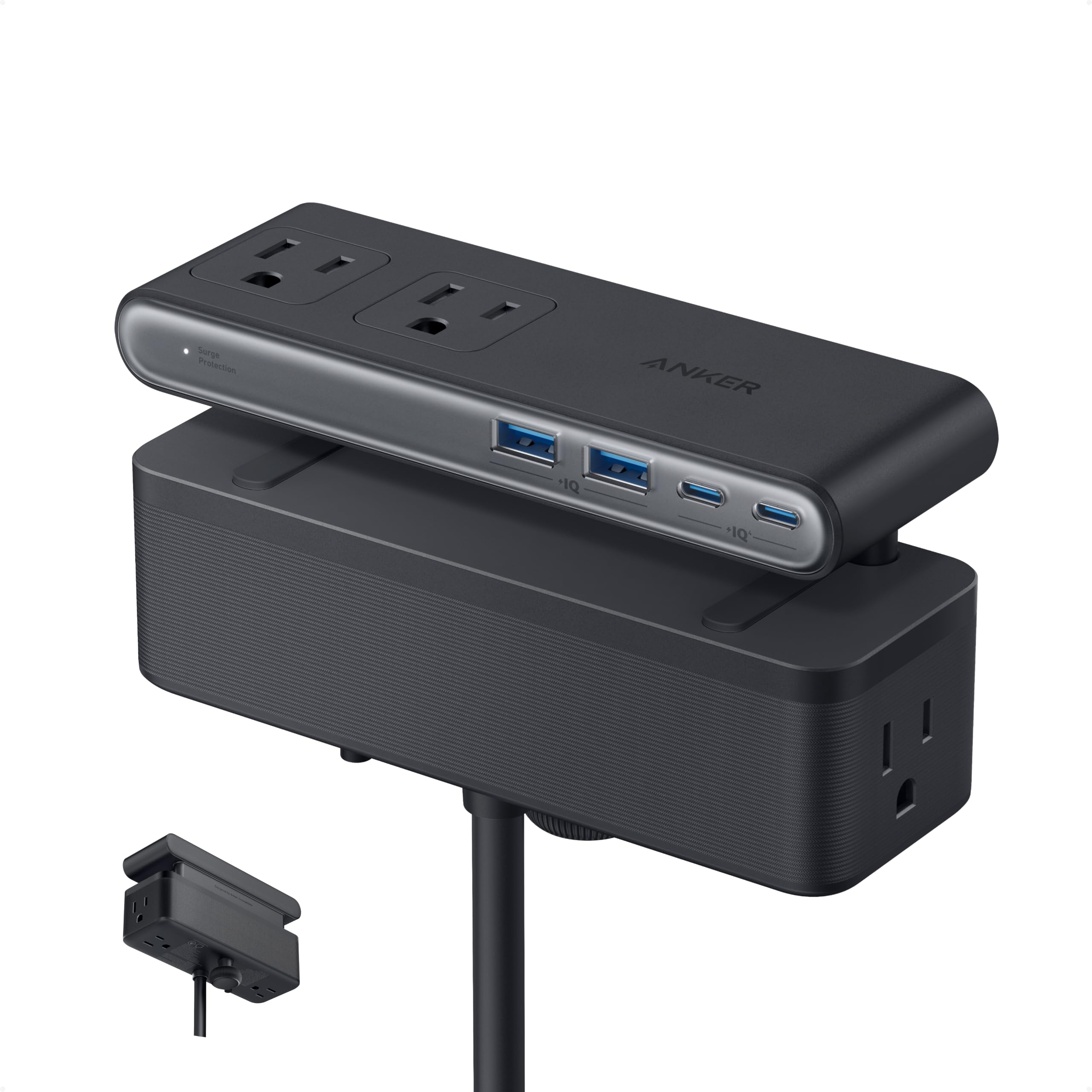
Ten ports on one clamp is the reason this sits at the top. You get six AC outlets, two USB-C, and two USB-A in a body that measures 6.02 by 2.06 inches and weighs 1.5 pounds, and it grips desk edges from 0.6 to 1.8 inches thick. Because the clamp holds tight, you can plug and unplug one-handed without the strip skidding away — a small thing that stops mattering the moment it stops working on cheaper strips.
The USB-C side delivers up to 70W through GaN technology (gallium nitride, a chip material that runs cooler than older silicon parts in a smaller body). That is enough for a phone, a tablet, or a thin laptop on the single-device port, and the 70W is shared when several devices pull at once. The 1,500J surge rating means the strip absorbs a spike in the power line — a jolt like a storm-related flicker — before it reaches your monitor or dock. A 5-foot cord runs from the strip to the wall.
What wins people over is how completely it deletes desk clutter; the mounted strip becomes the only place you plug anything in, and the mess disappears behind the desk line. The trade-offs are practical, not mysterious. The clamp also refuses curved edges, edges sloped past 45°, and desks with no lip to grab — measure your desktop edge before you order, because this is a mount, not a sit-on-top strip.
What earns the top spot
- Six AC outlets plus two USB-C and two USB-A in one clamp-mounted bar
- 70W USB-C fast charging via GaN for phones, tablets, and thin laptops
- 1,500J surge protection guards the gear plugged into it
- Adjustable clamp fits 0.6–1.8 in desk tops and stays put for one-hand plugging
Where it stops short
- 70W is shared across devices, so a power-hungry gaming laptop will want more
- The 5-foot cord is short for desks set away from a wall outlet
- Won’t clamp curved edges, slopes over 45°, or lip-free desks
Buy this if: you want your desk outlets within reach and the floor strip gone for good.
Think twice if: your desk edge is curved, glass with a rounded lip, or thicker than 1.8 inches.
2. Kuntine.B Desk File Organizer, 5-Section Upright Mesh
Five upright slots that stop paperwork from becoming a pile.
If your desk’s real problem is paper rather than cables, this is the cheap fix. It stands on a thick solid steel panel base and splits into five large vertical compartments, with room for letter paper, notepads, envelopes, books, and a phone. The footprint is 12 3/4 inches wide by 11 1/4 inches deep by 7 1/2 inches tall, so it sits on a desk without eating the whole surface.
Plan for assembly. Most buyers report it goes together fast — under three minutes with the small screwdriver in the box for some — but a few ran into screws that wouldn’t line up. Reaching a hand between the mesh sides to drive a screw takes patience. Budget a few minutes of fiddling and you are fine; expect a five-second snap-together and you may be annoyed. Once built, it’s genuinely sturdy, and the powder-coated finish holds up to daily handling.
Sturdiness and plain usefulness are what carry it: it holds its shape, holds standard file folders, and some owners use it well outside the office. One keeps cookie sheets and broiler pans corralled in a cabinet, another uses it for kitchen papers. It’s a sturdy, no-fuss sorter that tidies a paper pile without pretending to be furniture.
The honest read: a solid metal sorter that solves paper clutter cheaply and looks tidy on the desk; the mesh-and-screw build occasionally fights back during assembly, so set aside a few patient minutes.
Reach for this if: paper is your clutter and you want five upright slots on a sturdy steel base.
Look elsewhere if: you need shelving and drawers too — this one is pure filing.
3. Nulaxy 360° Rotating Ergonomic Laptop Stand
A stand that swivels your screen toward whoever’s looking without moving the laptop.
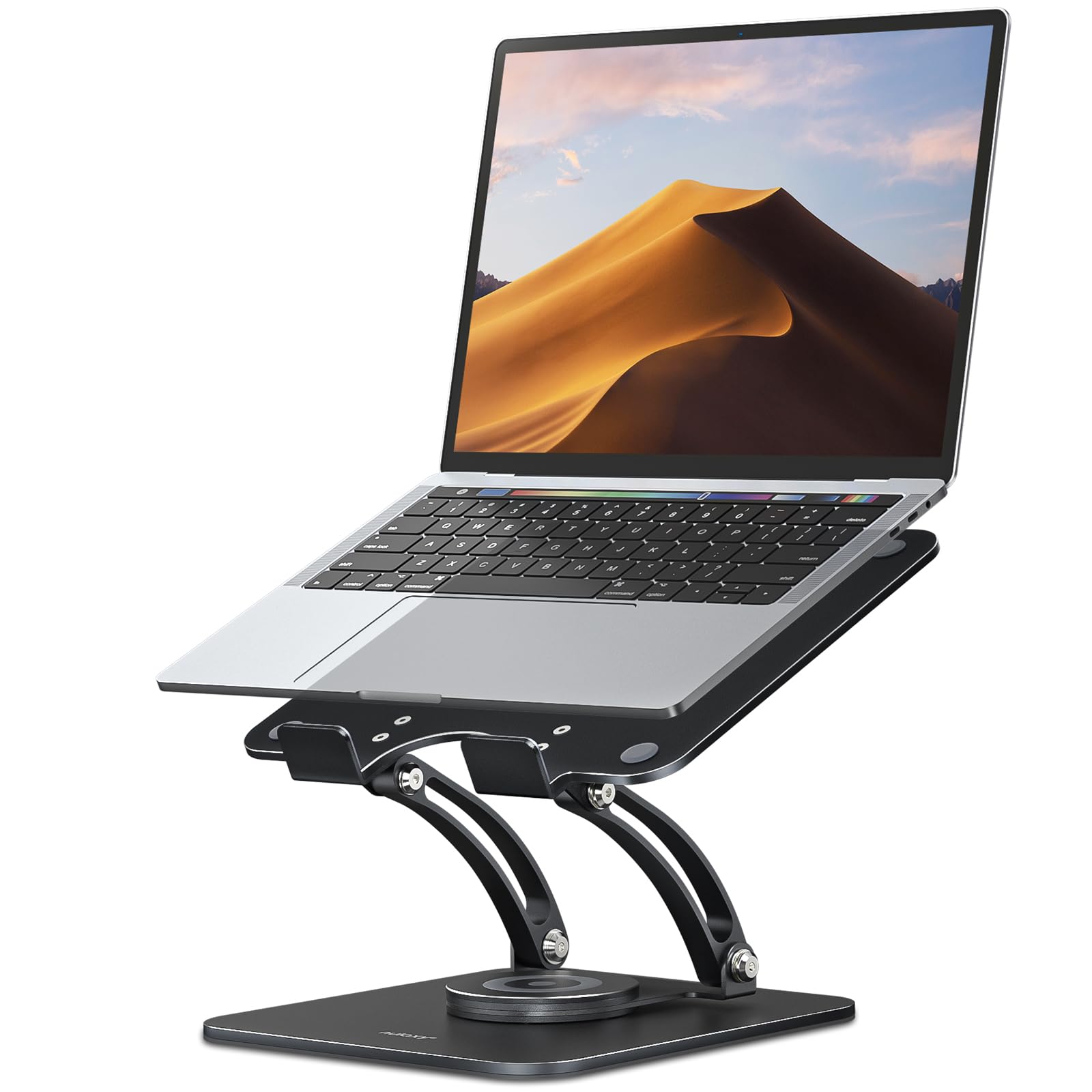
Twenty-two pounds of load capacity is what makes this stand worth owning with a heavy machine. That covers big business laptops and gaming rigs up to 16 inches, and the reinforced baffle hooks plus non-slip silicone pads keep the machine from sliding. The base spins a full 360 degrees, so you can swing the screen toward a colleague or a video call without dragging the laptop off its stand. The hinges are built for repeat use — the maker lists them as passing 6,000+ rotation tests.
Adjustability is the second reason it works. You set height and angle to lift the screen toward eye level, which takes the downward tilt out of your neck during long sessions. The frame is aluminum composite panel with silicone contact points, and it folds flat to about backpack size at 840 grams, so it travels. Owners describe the rotation as smooth and the whole thing as flexible enough to reposition many ways.
One honest catch: a couple of owners find the up-and-down adjustment stiff at first, and it occasionally takes a screw tweak before it moves the way you want. That’s a setup chore rather than a flaw — once dialed in, it holds.
Why it earns a spot: 22 lb of support plus a spinning base makes it the standout for anyone who shares a screen or uses a heavier laptop.
The small print: the vertical adjustment can feel tight out of the gate, so plan a couple of minutes to loosen and set it where you want it.
Pick it for: heavier laptops and a screen you want to swivel toward guests or the camera.
Pass on it if: you want a fixed, set-and-forget stand with nothing to adjust at all.
4. iCasso Mouse Pad with Wrist Rest, 4-Piece Desk Pad Set
A matching four-piece set that softens the wrists and dresses up the whole desk.
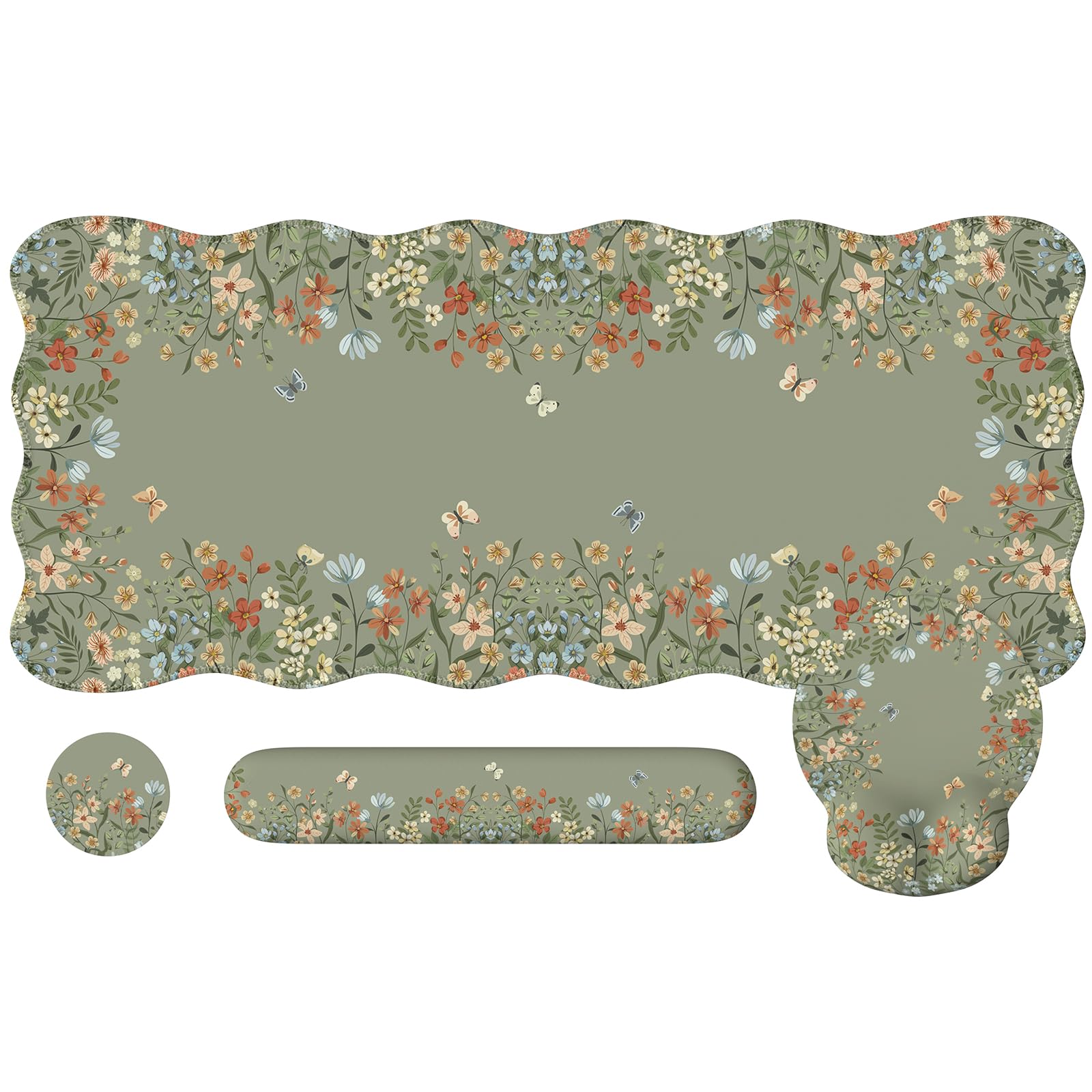
Cushioning is the reason to buy this bundle. The keyboard wrist bar is 17.3 by 3.1 inches with 0.78 inches of memory foam, and the mouse pad has a contoured groove that cradles your hand. Together they hold your wrists in a neutral position while you type, which is the part that matters during long sessions. The XL desk mat underneath measures 35.4 by 15.7 inches, with a coaster rounding out the four pieces — all in the same print, so nothing clashes.
The surface is fine Lycra over a textured rubber backing, which means your mouse glides and the mat stays anchored instead of wandering across the desk. Stitched edges resist fraying, and cleanup is easy: wipe it or machine-wash on gentle and air dry. The soft floral print and scalloped border give a plain home office some personality without sacrificing the mat’s grip or cushioning.
Two things worth knowing. The mat is genuinely large and wants a desk 30 inches wide or more — on a narrow pull-out keyboard tray it will overhang. And color opinions divide: plenty adore it, some find the shade slightly off from the photos. If you’re particular about exact tones, set expectations accordingly.
Where it shines
- 0.78 in memory foam keyboard bar plus a contoured mouse pad groove support both wrists
- 35.4 x 15.7 in mat protects the full typing zone in one piece
- Lycra surface glides; rubber backing grips; machine-washable on gentle
- All four pieces match, so the desk looks deliberate
Where it snags
- The XL mat needs a desk 30 in or wider and will hang off a narrow keyboard tray
- Color is a love-it-or-nudge-it point, with some finding it off from the listing photos
Choose it when: wrist fatigue is your daily complaint and you want a matching set that lifts the desk’s look.
Skip it when: your desk is under 30 inches wide or you want a plain, no-pattern surface.
5. DAOUTIME 4-Tier Mesh Desk Organizer with File Holders

A four-level tower that swallows folders, pens, and loose bits in one footprint.
Where the Kuntine.B keeps it simple, this organizer goes full furniture. You get five vertical classifiers, a sliding drawer with three compartments, and two pen holders, all built from retro wood paired with strong metal. The whole thing measures 9.06 inches deep by 13.58 inches wide by 16.34 inches tall — that’s real vertical storage, so it tidies a surface by stacking upward instead of spreading out. Buyers describe it as compact in footprint but genuinely roomy in capacity.
The clever bit is the DIY layout: the sections can be arranged to fit how you work, so a stack of folders, a pen cup, and a drawer of small items all have a home. Assembly takes a short session — around 20 minutes by one buyer’s account — with clear instructions and hardware included, and the metal-and-wood combination holds together solidly with no wobble once built.
The catch is fit-and-finish at the details. Some kits arrived with parts that didn’t line up perfectly — most of that is solvable with a screwdriver, but it means a less-than-instant build for a few buyers. Given how much it holds, though, it’s the most storage you’ll get per square inch of desk among the organizers here.
The draw: four tiers and five file sections turn a vertical column of desk space into a full filing and pen station.
The fine print: expect a short assembly session and the odd screw that wants a manual tweak; the upside is a sturdy, roomy organizer once it’s up.
Best match for: a home office or homework station that needs folders, pens, and small bits all stored in one place.
Probably not for: anyone who wants something that unfolds ready to use with zero assembly.
6. LitONES Video Conference Lighting for Zoom, 30 Modes
A soft square light panel that makes your webcam image look less like a cave.
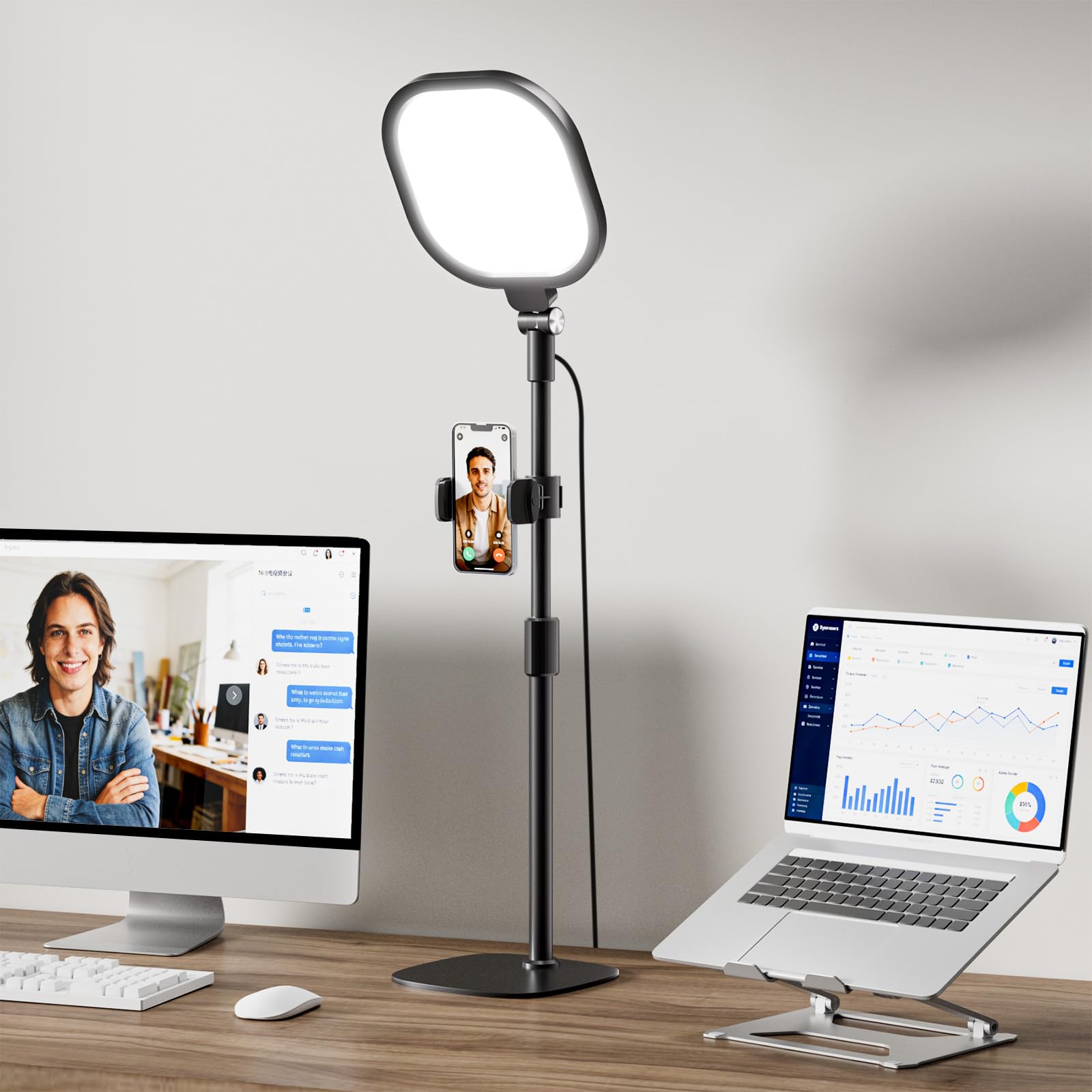
CRI above 98 is the spec that sets this light apart. CRI (color rendering index) is a measure of how faithfully a light shows true colors, and 98-plus means skin tones read as they do in natural light rather than turning orange or greenish. That’s why your face looks better here than under a desk lamp. The 7-by-7-inch square panel also spreads light over a wider area than a ring does, and a 4-layer optical soft panel with diffusion cuts the harsh glare that leaves you squinting through calls.
The controls reward fiddling. You get three color temperatures and ten brightness levels, combining to 30 modes, with stepless dimming from 10 to 100 percent and 2700K to 6500K switching — from warm-lamp tones to daylight. A memory function saves your last setting, so you don’t reset it every meeting. The metal stand adjusts from 20.5 to 28.5 inches, and the head plus phone holder rotate a full 360 degrees.
Two practical points before you buy. On a desk with overhead shelves, the 28.5-inch top height can overshoot or leave a white circle reflected in glasses, so measure your clearance. And this is a light, not an immortal one — the occasional unit fails early, which is worth knowing since the brand backs it with a 36-month warranty.
What sells it: high color rendering and a big soft panel are what make your camera image look natural, and the 30 modes plus memory keep it hands-off once set.
What to check: clear shelf height above your desk and consider glare if you wear glasses.
Worth grabbing if: you’re on video calls most days and want a natural, glare-free glow on your face.
skip it if: overhead shelving crowds your desk — the tall stand may not fit.
7. Univivi No Drill Under Desk Cable Management Tray, 36 inch
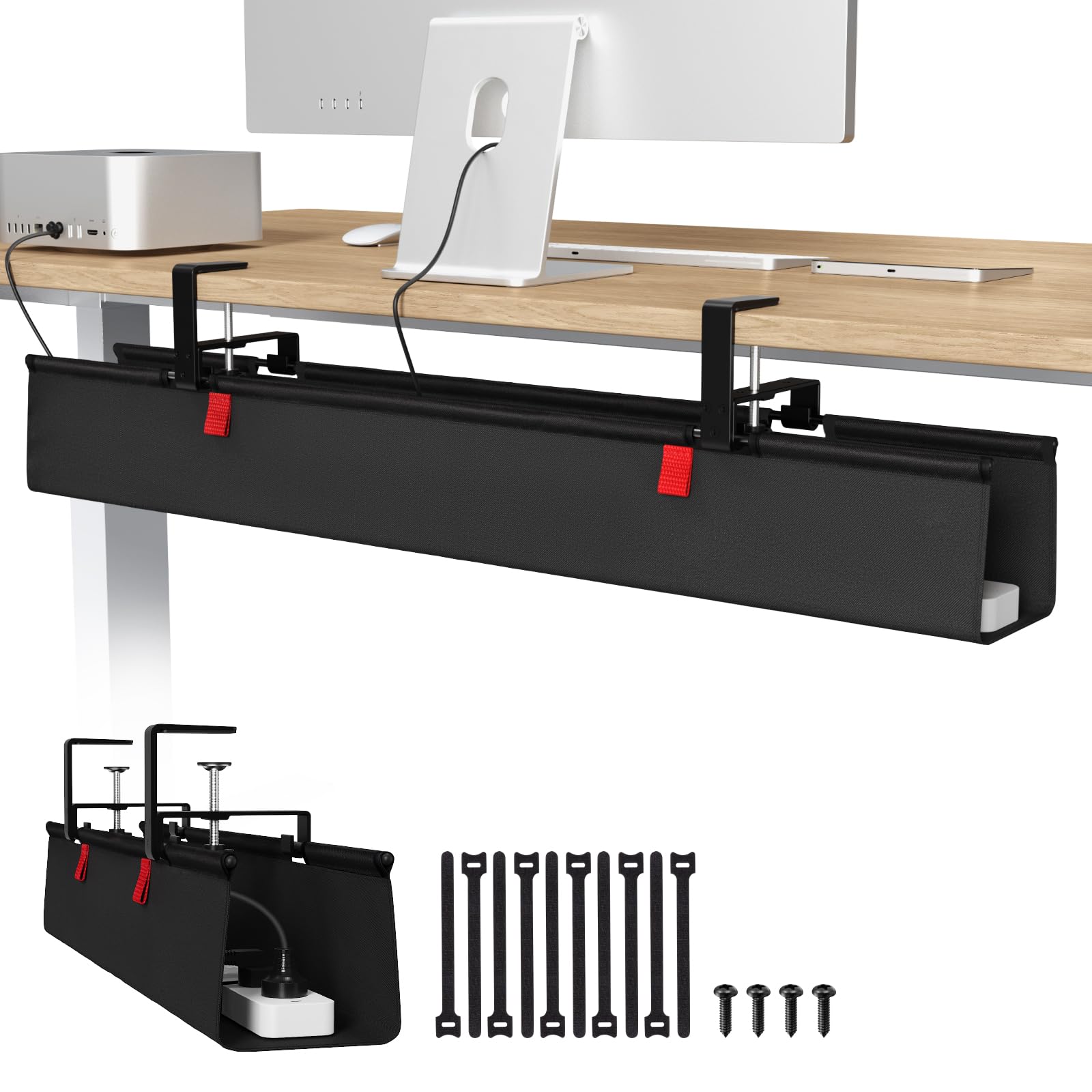
A fabric basket that hides the power brick and cord tangle you’ve been kicking.
Thirty-six inches of tray length is the selling point. That’s enough to catch a power strip, adapters, and a brick or two and take all of it off the floor, which means no more kicking a cord snake while you work. The tray is built from thick 600D Oxford fabric — a heavy-duty woven cloth — with a flame-retardant finish and sturdy metal brackets, so it holds weight without sagging. It measures 36 by 5.5 inches in L and W.
Installation gives you two routes: a no-drill clamp-on for renters or anyone who doesn’t want holes, or a screw-in mount for a more permanent hold. Both work on wood, glass, and metal table tops. Built-in ties let you pin each item in place, and you can unfold the tray to add or remove gear without dismantling it. Owners consistently describe the setup as straightforward, and the fabric look a step up from bare metal trays.
The honest limit is thick desks: the included clamps can be too small for a chunky top, in which case you’ll need the screw-in route instead. Also check for clearance — if your desk has built-in drawers or a back rod, you need at least 5.3 inches of gap along the edge, or the tray can’t clamp on.
what separates it
- 36 in of capacity hides a surge protector, adapters, and cable runs
- Clamp-on for no drilling or screw-in for a firmer hold, on wood, glass, and metal
- 600D Oxford fabric with flame retardant, plus built-in ties to pin cords
- Unfolds for easy access to add or remove gear
The fine print
- Included clamps can be too small for a thick desk, forcing the screw-in route
- Needs about 5.3 in of clear edge if the desk has drawers or a back rod
- Clips on the tabletop edge, so it won’t be fully invisible
Get this for: clearing every cord off the floor and out of kicking range.
Not the one for: ultra-thick tops where the clamp won’t span — you’ll be drilling instead.
8. Everlasting Comfort Memory Foam Seat Cushion, Black (Large)
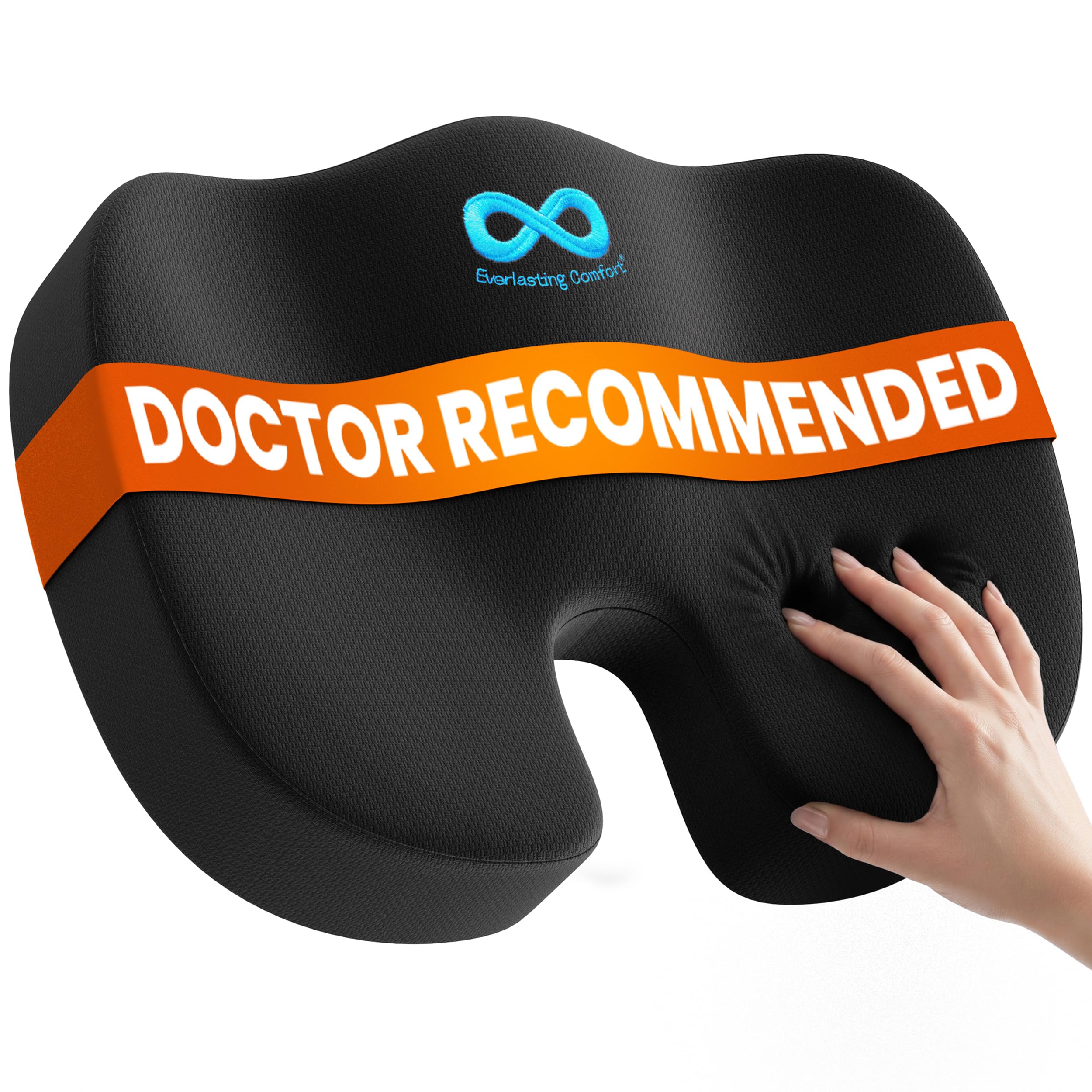
The cushion that takes the sting out of a hard chair during long sittings.
Here’s the headline number: 4.0+ stars across 100,000+ owners. That’s the crowd favorite of this whole list, and the vast majority of them are simply happy their chair finally feels bearable. The build is 100 percent memory foam with a U-shaped cutout at the rear that takes contact off the tailbone, sized 17.3 by 14 by 3.15 inches in medium firmness. The cover is breathable and machine-washable, with a non-slip bottom to keep the cushion where you set it.
What makes it versatile is that it isn’t tied to the desk. The low-profile shape slides onto office chairs, car seats, airplane seats, and stadium benches, so the same cushion that saves your workday also helps a long commute. It keeps its shape over time rather than flattening, and owners who sit for long stretches at a desk describe it as making a real difference to how bearable the day feels.
Firmness is the split point. Many find the foam firm without being hard; a smaller group want it softer. And while the bottom is non-slip, a few find it creeps backward on a slick chair cover and needs a periodic nudge back into place. Neither flaw changes what the cushion does: it supports your body on a seat that never did.
Why it’s the people’s pick: 100 percent memory foam, a tailbone cutout, and a washable non-slip cover make a hard chair feel supportive for hours.
The one caveat: foam firmness is a matter of taste — if you like a plush, sink-in feel, this may read as firm.
Built for: all-day sitters on a firm chair, and anyone using the same cushion at the desk and in the car.
Not for you if: you want a soft, squishy seat pad rather than medium-firm support.
9. C CUSHION LAB Foot Rest for Under Desk, Adjustable

A soft, raised landing pad for feet that are tired of dangling above the floor.
Raising your feet to a supported angle is the whole idea, and this cushion does it with proprietary CloudSupport foam that sinks under pressure and holds its shape. The raised WaveMassage ridges on top give your soles a textured surface to work against while you sit. It measures 17 by 11 by 5.5 inches and weighs 1.7 pounds, so it slides under most desks without hogging legroom, and it stays put thanks to a non-slip bottom.
What people appreciate is how soft it feels compared with a hard footstool. The cushioning takes the weight off your feet and helps your legs sit at a more comfortable height, and the flip-over rocker side is a small extra that lets fidgeters keep their feet busy during focused work. A removable cover means you can wash it when the foam starts to show wear.
The catch most buyers hit is size and firmness: it can be smaller than photos suggest, and a few wish it were a touch firmer for more lift. If your desk is high and you want a big, hard platform, this is softer than that. If you want your feet cradled and raised a few inches on soft foam, it delivers.
The soft landing: CloudSupport foam plus a non-slip base means tired feet get support without a hard, rigid stool under your desk.
What to know: it runs a little smaller and softer than some photos imply, so set expectations for a cradling feel rather than a firm platform.
Made for: long sitting days where your feet want something soft and raised to rest against.
Probably not: the best fit if you want a large, firm footstool with a high lift.
Know the Specs
What “70W USB-C” actually means
A watt is a measure of how much power flows into a device. A 70W USB-C port can charge a phone, tablet, or thin laptop quickly, but the number is the ceiling shared across everything plugged into the USB side. Heavier gaming laptops want more, so treat 70W as “enough for most everyday gear,” not “enough for everything.”
What “CRI>98” means on a video light
CRI is the color rendering index — a score for how faithfully a light shows true colors, with natural daylight near the top. A rating above 98 means skin tones look like skin instead of orange or green. It’s why a high-CRI panel makes your webcam image look more like you, especially on video calls.
Why memory foam density matters
Memory foam that is too soft sinks and stops supporting; too firm and it feels like a board. The seat cushion here lists medium firmness with a U-shaped cutout to offload the tailbone, while the foot rest uses a softer foam tuned to cradle feet. Match the foam feel to how much support you want, not just the label “memory foam.”
Clamp fit and desk thickness
Clamp-mounted trays and strips specify an edge thickness range — the power strip here fits 0.6 to 1.8 inches, and the cable tray wants 5.3 inches of clear space if the desk has drawers. Measure before you order: curved, sloped, or lip-free edges will refuse the clamp entirely.
Common Questions
Will a clamp power strip fit my desk edge?
Can a laptop stand really reduce neck strain?
Is 70W USB-C enough for a laptop?
Do I need a video light if my webcam is good?
How do I stop a seat cushion from sliding on my chair?
Can I install a cable tray without drilling?
Is a foot rest good if my chair is already comfortable?
How much weight can a laptop stand hold?
Are file organizers hard to assemble?
What desk size do I need for a large desk mat?
The Bottom Line
For most home desks, the working from home accessories winner is the Anker Nano Power Strip. It puts ten ports on a desk clamp, so you clear the floor mess and keep power within reach — just check that 0.6 to 1.8 inch edge range first. If your problem is paper, the Kuntine.B File Organizer tidies it in five slots. And if your neck rounds forward by 2 p.m., the Nulaxy Laptop Stand lifts the screen toward eye level with 22 pounds of support. Start with the fix your body complains about most, then add the rest as your routine settles in.
How we choose
We do not accept paid placement. Every pick is matched to a real buyer and a real use-case; we do not hands-on test units.
Sources
Specifications: manufacturer listings and product documentation. Review insights: verified customer reviews, as of October 2026. Pricing: not shown on this page (it changes often); check the current price via the retailer link.
As an Amazon Associate, Home Digitized earns from qualifying purchases. This does not affect which products we feature.