
Specs are compiled from manufacturer listings and verified buyer reviews and can change over time — please confirm the key details on the product page before buying.
You want a tablet you can actually write on — one where your pen strokes land under the nib instead of chasing it. The short answer: pick the pen and the writing feel first, the screen specs second — a fast processor won’t fix a stylus that lags behind your hand. Below are nine writing tablets for students, sorted by what each one does best, with the real trade-offs spelled out so you pick the right one the first time.
This guide is built by comparing the manufacturers’ published specifications and the patterns across verified customer reviews, so you get each pick’s real strengths and trade-offs instead of marketing spin.
A pen that needs charging, a screen that glares under library lights, and a battery that dies mid-lecture are the three regrets this guide is built to prevent. This guide to the writing tablets for students covers which stylus never needs a charge, which screen stays readable in sunlight, and where each pick honestly falls short.
Top Picks


How To Choose The Best Writing Tablets For Students
The biggest mistake students make is buying on screen and processor specs, then discovering the pen drags across glass like a crayon. Writing feel is a physical thing — the texture of the screen under the nib, the pressure it takes to draw a line, and how quickly the mark appears. That is the part you live with every lecture.
Start with the pen, not the processor
A battery-free pen (one that draws power from the screen instead of its own cell) means you never hunt for an AAAA battery before an exam. Pressure sensitivity — the number of levels the pen registers — decides how much your line thickens when you press harder. An E Ink screen gives you paper texture and sunlight readability, while an LCD with an etched coating (a microscopically roughened surface) mimics that feel but stays brighter.
Match battery and charging to your timetable
A long battery rating is only useful if it survives back-to-back classes and a late library shift. Check the milliamp-hour figure (the size of the battery tank) and the charging wattage, because a big battery with a slow charger is a plug-in-early device. E Ink readers stretch days or weeks because the screen only draws power when it changes things.
Decide if you need an ecosystem or a blank page
A full Android tablet lets you install any note app, watch lectures, and run a calendar. A purpose-built writing tablet strips away notifications and apps, which some students find makes focus easier. Decide which of the two you are before you buy.
Side-by-Side Comparison
| Model | Best For | Display | Battery | Storage | Amazon |
|---|---|---|---|---|---|
| Lenovo Idea Tab★ Best Overall | All-round study tablet | 11″ 2.5K IPS 90Hz | 12 hours | 256 GB | Amazon |
| Samsung Galaxy Tab S6 LiteBudget Note-Taker | Budget note-taking | 10.4″ LCD | 13 hours | 64 GB | Amazon |
| XPPen Magic Note PadPaper-Feel Pick | Paper-feel writing | 10.95″ etched LCD 90Hz | 4 hours | 128 GB | Amazon |
| Kindle Scribe (32GB, Like-New) | Reading plus notes | 10.2″ glare-free 300 ppi | Weeks of reading | 32 GB | Amazon |
| Lenovo Idea Tab Pro | Big-screen coursework | 12.7″ 3K LCD 90Hz | 11 hours | 128 GB | Amazon |
| Penstar eNote 2 | E Ink note device | 10.3″ E Ink 300 ppi | Up to 4 weeks | 128 GB | Amazon |
| reMarkable Paper Pro Move | Pocket portability | 7.3″ Canvas Color | — | — | Amazon |
| iflytek AINOTE 2 | Lecture recording | 10.65″ E Ink | 4000 mAh | — | Amazon |
| Kindle Scribe (64GB) | Focused reading and writing | 11″ glare-free front light | Weeks per charge | 64 GB | Amazon |
Detailed Reviews
1. Lenovo Idea Tab
Our pick — 4.5+★ from 900+ verified ratings; the strongest balance of quality and price.
The study tablet that pairs a 90Hz screen with 256 GB and a pen in the box.
If you want one device that covers lectures, sketching, and streaming breaks, this is the most balanced pick here — 4.5+ stars across 900+ ratings backs that up. The screen is an 11-inch 2.5K IPS panel running at 90Hz, which means the writing surface redraws your strokes often enough that the ink keeps up with your hand instead of smearing behind it. The 2560 x 1600 resolution keeps a page of equations and diagrams crisp rather than mushy.
What wins people over is the overall build quality — it is the most-praised thing about this tablet by a wide margin, and owners describe it as a genuinely smooth midrange machine that runs well on its highest settings. Storage is the quiet advantage: 256 GB beats the Galaxy Tab S6 Lite’s 64 GB, and it takes a microSD card, so downloaded lecture videos and a full textbook library are not a problem. Battery is 7216 mAh, rated for 12 hours of YouTube, and a 20W charger tops it up.
Students get four built-in learning apps, including Lenovo AI Note, Squid, Nebo, and MyScript Calculator, plus Circle to Search for circling a formula and getting an answer without leaving the page. The honest catch is the bundled folio case: it draws complaints for thin edges, a wobbly stand angle, and no closure, so budget for a better case. The stylus runs on an AAAA battery rather than drawing from the screen, and there is no wall charger in the box.
Where it shines
- 90Hz 2.5K display makes handwriting feel live
- 256 GB expandable storage outclasses cheaper rivals
- 12-hour battery and included folio + pen
- Four learning apps and Google Circle to Search built in
What to plan around
- Bundled folio case is flimsy with a weak stand
- Pen takes an uncommon AAAA battery
- No AC adapter included in the box
Reach for this if: you want one tablet for notes, reading, drawing, and entertainment with storage to spare.
Know first: the included case is the weakest part — plan a replacement from day one.
2. Samsung Galaxy Tab S6 Lite
A refurbished classic that puts a pressure-sensitive S Pen in your bag for less.
The S Pen here needs no charging at all — it draws its power from the screen, so it is always ready when you pick it up, and it snaps magnetically to the tablet so you do not lose it. That means it is always charged and ready when a lecture starts. The pen carries 8192 pressure levels and handles palm rejection well, so resting your hand on the screen while writing does not scatter stray marks across the page.
Battery is the story against the Lenovo Idea Tab: this one rates 13 hours to the Lenovo’s 12, a slight edge for back-to-back days. Its 6840 mAh cell is only marginally smaller than the Lenovo’s 7216 mAh, and it lives on a 6840 mAh rating for streaming. The trade is storage — 64 GB against the Lenovo’s 256 GB — so this is the pick for students whose notes and reading live in the cloud rather than as downloaded video.
This is a Renewed unit, and the value is real: buyers report it staying fast and responsive and holding up as a good deal. Honest notes — refurbished “excellent” units can arrive with minor corner wear, Bluetooth is a known weak spot, and one defective screen-on-pen incompatibility has been reported. The screen is an LCD rather than AMOLED, which an owner-driven review flags for a weaker blue-light filter.
Who it fits: students on a tighter budget who want a genuine writing pen and a full day of battery without paying flagship money.
The honest limit: 64 GB fills quickly if you download video, and the refurbished route means checking the pen works the moment it lands.
Pick this when: budget matters and cloud storage is already your habit.
Think twice if: you need to keep large files offline or want guaranteed-new hardware.
3. XPPen Magic Note Pad
An etched-glass Android tablet built to make a stylus feel like a pencil.
The number that defines this pick is the pen: an X3 Pro Pencil 2 with 16384 pressure levels, twice the 8192 on most tablets here, so pressing harder produces visibly thicker, darker strokes. It is battery-free, so it is always ready, and the matte AG nano-etched screen gives you a paper-like drag instead of glassy slide. The display uses TCL NXTpaper 3.0 and shifts between monochrome, light-color, and nature-color modes with one button — useful for cutting glare and eye strain during a long reading session.
On the hardware side you get 6 GB of memory against the Lenovo Idea Tab’s 8 GB, but 128 GB of storage and a 90Hz refresh rate that keeps page turns from ghosting. The 8000 mAh battery pairs with a 20W charger. There is a 13-megapixel front camera plus two speakers and two microphones, and the whole thing weighs 495 g at 7 mm thick, so it slides into a bag between classes.
What owners praise most is the smoothness of the writing and the screen texture that reads like real paper — that is the draw. The honest catches: this is not E Ink, so expect a narrow ideal viewing angle that the maker itself notes, the panel is dimmer than the rated 400 nits in some hands, and battery is rated 4 hours, the shortest on this list. It is a writing-first device, not a gaming or heavy-web machine.
Why writers like it
- 16384-level pressure sensitivity for fine, expressive lines
- Paper-like etched surface cuts glare and eye strain
- Free native note app with handwriting-to-text and PDF editing
- Three color modes switch with a single button
Where it asks for patience
- 4-hour battery rating is the shortest here
- Narrow best viewing angle by design
- Panel brightness trails the rated figure in practice
Made for: note-takers and sketchers who care most about how the pen feels on the screen.
Not for: heavy video-watchers or anyone needing all-day unplugged battery.
4. Kindle Scribe (32GB, Like-New)

A refurbished writing tablet that folds your notes and your reading into one page.
This is the pick for the student who reads as much as they write. The 10.2-inch display is glare-free and front-lit at 300 ppi (pixels per inch — the density that keeps text sharp), so it holds up under a lamp or in sunlight. The Premium Pen needs no charging or setup, and the surface has the texture of pen on paper. Built-in AI tools convert your messy handwriting to typed text and can summarize your notes.
That paper feel is what defines the device — it is the single most-praised quality in owner feedback, and buyers describe preferring its writing feel over an iPad. Notebooks sync across your registered devices and can be emailed in a few taps. A Like-New unit is refurbished and certified to look and work like new, with the same limited warranty as a new device — a sensible route for stretching a student budget.
The honest catches: it is a big, desk-bound device rather than a pocket companion, and screen refresh is slower than a standard LCD tablet, though writing itself appears without delay. Input lag and reliability draw some mixed comment, and value is a split verdict — worth it if you will read and write daily, less so as a casual gadget. The power button and USB-C port sit on the same side, which owners find awkward next to the pen magnet.
The writing verdict: a focused reading notebook, not a general tablet — and that focus is exactly what its owners want.
Choose it for: weeks of reading battery, a glare-free page, and AI handwriting cleanup for study notes.
Look elsewhere if: you crave app flexibility or a small screen for the train.
5. Lenovo Idea Tab Pro

A 12.7-inch 3K canvas that turns your desk into a study cockpit.
If your worst problem is squinting at a small screen while splitting a textbook, three tabs, and a calendar, this is the fix. The 12.7-inch 3K LCD at 2944 x 1840 gives you the most screen real estate on this list, and the 90Hz refresh keeps your pen strokes smooth. Under the hood a MediaTek Dimensity 8300 processor with 8 GB of memory and 128 GB of storage keeps multitasking from stalling, and the included Tab Pen Plus and folio case mean you write from the start.
Build quality carries this pick — owners praise it above everything else and describe genuinely premium hardware. Battery is the honest limit: a 10200 mAh cell rated at 11 hours, ahead of the XPPen’s 4-hour figure but a step behind the smaller Samsung’s 13 hours. A 45W charge gets you back quickly, though the charger itself is not in the box, so budget for one or you will be plugging in for days.
The 360Hz touch sampling rate (how often the screen checks for your finger) and 90fps support make it a capable gaming and drawing machine, and Google Gemini lends a hand on late-night assignments. Reports are clear-eyed on the trade: at this size it is heavy and desk-bound rather than a lap or bag fixture, battery-life impressions are split, and thermal throttling shows up under a long push. It is a workhorse for a fixed study station.
What it does brilliantly
- 12.7″ 3K screen for side-by-side coursework
- Dimensity 8300 + 8 GB for lag-free multitasking
- Pen and magnetic folio case included
- 45W quick charging and Google Gemini on tap
The honest trade-offs
- No charger in the box
- Heavy, so it stays on the desk
- Battery-life impressions are mixed
Suits: students with a fixed desk who want screen space for real coursework and drawing.
Skip if: you need portability or all-day unplugged stamina.
6. Penstar eNote 2

A whiter-than-usual E Ink screen for reading and marking up texts all day.
The 10.3-inch E Ink display runs at 2480 x 1860 and 300 ppi, and the maker has stripped layers to push text closer to the surface for whiter whites and deeper blacks. A page of lecture notes or a PDF reads like printed paper — clear in sunlight, with none of an LCD’s glare. The exclusive stylus delivers 8192 pressure levels and needs no charging, and the built-in mic and four speakers let it double as a recording and playback device.
Battery is the headline for a day on the move: a 6500 mAh cell rated for up to 4 weeks, because an E Ink screen only draws power when the image changes. Under the hood there is 128 GB of storage, 4 GB of RAM, an octa-core processor, and Android 14 for third-party apps. A clever split-screen mode lets you read a book on one half and take notes on the other, and real-time AI voice-to-text, handwriting conversion, folders, and tags keep your files sorted.
What lands well is the weight and the writing experience — owners compare it to writing on paper. The honest catches come from the mixed side: some users report pens not working and performance lag, so check the stylus and update the software early. It is also a heavier device than its paper-thin profile suggests.
Its best match: note-heavy students and researchers who want E Ink clarity, paper feel, and multi-week battery between charges.
The fair warning: setup needs a little patience — verify the pen and run the latest update before relying on it in class.
A smart fit for: pen-first note-takers who value paper-like reading and forget-about-it battery.
Less so for: anyone expecting snappy app-switching and animation.
7. reMarkable Paper Pro Move

A paper-tablet that slips into a jacket pocket and writes in color.
Most writing tablets demand a desk. This one asks only a pocket. The 7.3-inch Canvas Color display runs at a native 954 x 1696, looks, feels, and even sounds like paper, and stays distraction-free by design with no notifications or app wall to pull you off task. It weighs 248.4 g, so it genuinely travels light, and the Marker Plus is included along with six spare tips and a USB-C cable.
Portability is the thing owners rave about — it fits easily in a purse or bag. Writing feels natural, colors are crisp, and it offers nine pen types and colors with a strong magnetic pen. Handwriting converts to typed text, and notes sync to the cloud for your mobile and desktop apps. Search for handwritten notes needs a Connect subscription, which is an ongoing cost to weigh.
Honest notes: the small size means more page panning, screen refresh shows a slight lag, and a case is not included, so the clean look costs you extra. Color and light bleed are split — some love the color, some find it dull. The battery is fine day to day, though a small number find it drains faster with the stylus attached.
Why students reach for it
- Pocketable 248.4 g frame travels anywhere
- Color display with nine pen types
- Handwriting-to-text conversion and cloud sync
Where it costs you
- Connect subscription needed for full search
- No included case; more panning on a small page
- Slight screen refresh lag
Ideal for: commuters and meeting-takers who want a distraction-free notebook in a pocket.
Weigh first: the subscription and the small page — this is a companion, not a primary study screen.
8. iflytek AINOTE 2

Built for the lecture you cannot write fast enough to keep up with.
This E Ink device is aimed squarely at capturing spoken content: it transcribes in 18 languages, converts speech to text, and offers AI assistance for summarizing and organizing what you heard. The 10.65-inch frontlight-free E Ink display writes with a paper feel across 8 brush styles, and the low-latency handwriting keeps the pen from fighting you. At roughly 4.2 mm thick it slides into a bag, and a 4000 mAh cell stretches to up to 14 days of use at about 30 minutes a day, with up to 113 days of standby.
The performance and practicality of the core note-taking draw positive feedback, so the fundamentals hold up. Google Calendar support and starred, circled, or triangled marks let you track tasks, and notes sync across AINOTE mobile and PC apps.
This is a device with real caveats, and you should hear them plainly. The frontlight-free screen needs external lighting — it is not built for dark-room writing. AI features and transcription need Wi-Fi and are not suited to confidential or fully offline meetings, and accuracy depends on audio quality, accent, and environment rather than being word-for-word. Functionality, handwriting recognition, and connectivity all draw a split verdict, so treat it as a capable assistant rather than a replacement for careful notes.
Where it earns its keep: long lectures and meetings where transcription and summaries save you the frantic scribble.
Best for: students who want recorded, searchable lecture content alongside longhand notes.
Consider the limits: Wi-Fi dependence, external light needed, and transcription that assists rather than replaces.
9. Kindle Scribe (64GB)
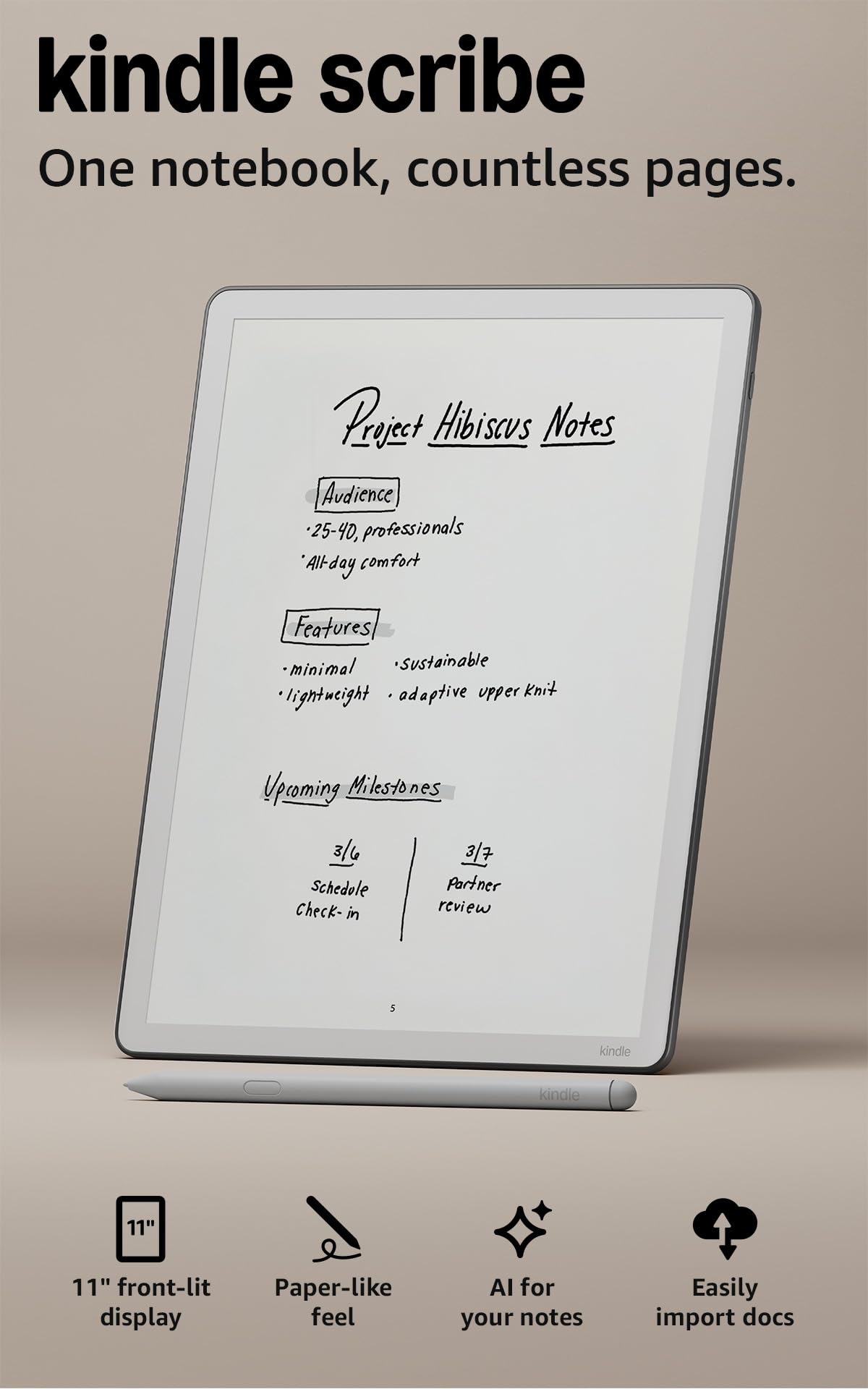
The distraction-free writer with an 11-inch page and a pen that never needs charging.
If your study problem is notifications pulling you off task, this is the device that removes them by design. The 11-inch glare-free display is front-lit so it adapts to your lighting and lets you adjust warmth at night, and at 5.4 mm thin and 400 g it stays comfortable for a long session. The 40% faster writing and page turns over the previous generation makes the pen feel immediate, and the included pen never needs charging, with a built-in eraser and shortcut button.
Here is where this pick beats the 32 GB Like-New version above: double the storage at 64 GB, a larger 11-inch screen against 10.2 inches, and AI tools that help you find information, ask questions about what you wrote, and generate summaries. You can also import files from Google Drive or Microsoft OneDrive, mark them up, and export as PDFs. Device quality and writing experience are what owners prize most, so the fundamentals are solid.
The honest notes: performance and value draw a split verdict, there is no color, and the built-in AI tools work inside the AI Notebook rather than across books and PDFs. There are no in-document links or split book-and-notebook view, and you are tied to the Amazon ecosystem. For pure reading plus writing, the crisp black-and-white screen is the sharper choice.
The case for it
- 11″ glare-free front-lit page with warmth control
- 64 GB storage — double the Like-New version
- Pen never needs charging; built-in eraser
- AI summaries and document markup in one place
The honest catch
- No color and no in-document links
- AI tools limited to the AI Notebook
- Amazon ecosystem lock-in
Pick it: if you want the largest, sharpest Kindle writing screen and storage headroom for coursework.
Look elsewhere if: you need color, broad apps, or document linking inside PDFs.
Know the Specs
Pressure levels and pen type
Pressure levels count how many gradations of force the pen can register — more levels mean line thickness and darkness respond more finely to your hand, which matters for fine notes and sketches. A pressure-sensitive pen that draws power from the screen means no battery to charge; a pen with its own cell (like the AAAA used by some) may need swapping.
E Ink vs etched LCD
E Ink only uses power when the image changes, so it can last days or weeks and reads beautifully in sunlight, but it refreshes slowly. An etched LCD feels paper-like and refreshes fast, but it draws power continuously. Choose E Ink for reading-heavy study and LCD for mixed media and app use.
Battery capacity vs rated hours
Milliamp-hours (mAh) measure the size of the battery, while rated hours estimate real use — the two can disagree because a large screen or bright LCD drains faster. Charging wattage matters too: a bigger battery with a slow charger is a keep-it-plugged-in device.
Glare, matte, and viewing angle
A matte or etched surface scatters light to kill glare, which is why these screens read well under lamps. The trade-off is a narrower ideal viewing angle, so look at the page head-on rather than from the side. Front lights let you read in the dark without an LCD’s brightness.
Common Questions
Will a writing tablet work for taking notes in a lecture hall without bright overhead light?
Does the stylus ever need charging or batteries?
Is E Ink better than an LCD for school note-taking?
Can I take handwritten notes and still export them as typed text?
How much storage do I need for a semester of notes and reading?
Will a small writing tablet feel cramped for full pages of notes?
Do these tablets need Wi-Fi to record and transcribe lectures?
Can these tablets replace my laptop for coursework?
Are refurbished or Like-New writing tablets a safe choice for students?
Which is better for drawing as well as notes?
The Bottom Line
For most students the winner is the Lenovo Idea Tab, because it balances a smooth 90Hz 2.5K screen, 256 GB of expandable storage, a 12-hour battery, and an included pen without forcing you to choose between writing and watching. If your priority is a genuine pressure-sensitive S Pen on a tighter budget, the Samsung Galaxy Tab S6 Lite delivers that with the longest rated hours here. And if you want distraction-free reading and writing with AI handwriting cleanup, the Kindle Scribe 64GB is the one to reach for — a focused tool for the student who knows exactly what they need.
How we choose
We do not accept paid placement. Every pick is matched to a real buyer and a real use-case; we do not hands-on test units.
Sources
Specifications: manufacturer listings and product documentation. Review insights: verified customer reviews, as of October 2026. Pricing: not shown on this page (it changes often); check the current price via the retailer link.
As an Amazon Associate, Home Digitized earns from qualifying purchases. This does not affect which products we feature.